I am finally at the end of the first copyedit review for my book “Developing Business Intelligence Apps for SharePoint” and the experience has left me with some valuable tidbits about how best to edit 400+ page word documents. I will post these during the course of the next week.
While co-author, Dave Feldman, and I are both using Office 2013 and had every intention of leveraging all of the great features that come as a part of the .docx format, we found that people in the book publishing biz tend to be on less up to date software and would send us drafts in .doc format. This made it so that the “Mark Comment as Done” feature is not available.
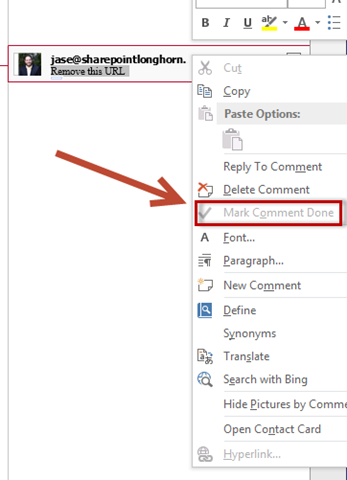
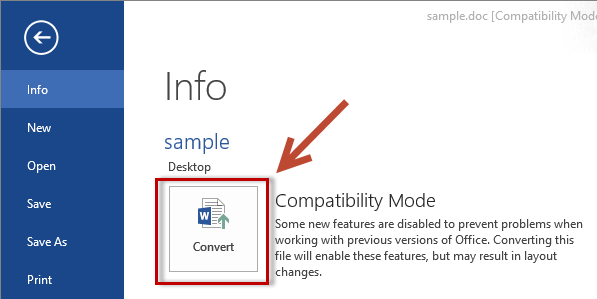
Convert from Compatibility Mode
To solve this go to the File Menu (or Backstage) and select convert.
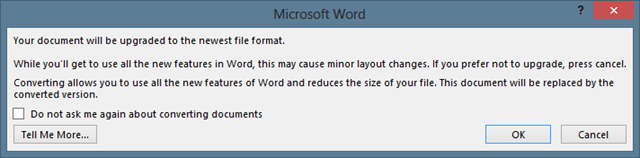
You will get a warning that you are about to upgrade to the newest file format to which you will say OK.
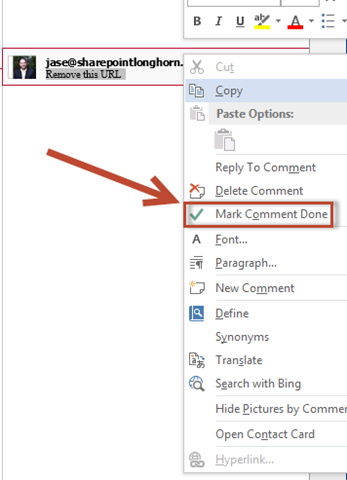
This will light up “Mark Comment Done”.
Comments
4 responses to “Enabling the “Mark Comment Done” feature in Word 2013”
Thank you!
Exactly what I was looking for. Thanks!
Great! How I can add this command “Mark Comment Done” to “Review” ribbon, in the “Comments” section?
You made my day. How on earth did you come up with this solution? Is there any documentation anywhere?