Category: SharePoint

  • Speaking at SharePoint Connections Coast to Coast 2011 in San Antonio

    SATX

    My friend, Cornelius J. van Dyk, and I will be presenting at this year’s SharePoint Connections Coast to Coast conference in San Antonio held May 23-25 at the Hyatt Regency Hill County Resort & Spa.

    We will be teaching the ITPro Pre-Conference “SharePoint Collaboration Bootcamp” plus presenting three sessions, “Heavy Metal PowerPivot”, “Time Is Money. How SharePoint Logging will Save You Both!”, and “Wish I’d Have Known That Sooner! SharePoint Insanity Demystified”. All 3 of these sessions promise to be fresh and exciting so come out and see us if you’re anywhere in the San Antonio area during that time.

    We hope to see you there!

    jase 

  • SPFLogger–A whole new way to look at SharePoint 2010 Logs

    One of the most amazing, and little talked about, features of SharePoint 2010 is its new logging database and the power that comes along with it.  About 4 months ago I noticed a gap in the market and started talking to 2 friends of mine, David Feldman and Cornelius J. van Dyk, making the statement “I think that this would make for a really neat winforms app.”  After some brain storming we decided to take the idea a different direction and use Silverlight 4 RIA Services.

    The tool in its initial beta offering is fairly simple, yet elegant.  It gives the user a very concise view of their NTEvent Logs, ULS Logs, and Timer Job Logs.  Rather than having to write T-SQL against the Logging Database’s views, we provide an easy to use Silverlight interface to quickly and easily view the log entries, complete with filtering and some basic analytics for NTEvent Logs and Timer Job Logs.

    This was my first foray into development and coding, as almost all of my career in technology has been spent on the ServerOperationsArchitecture site of the world, and this was an eye opening and career life changing experience.  I got to work with 2 of my very good friends on a project that I am very passionate about, and I have been overly supported by my amazing, wonderful, beautiful, and ever patience wife, Jill, and my 2 amazing boys, Max & Sam, as I have dedicated my every waking free moment to this project.

    Tonight, after 4 long months, I clicked the button to release SPFLogger to the CodePlex community.  Please go check it out and give us feedback so that we can continue to grow and evolve this into something great.  It is currently licensed under a dual license which allows for personal use under GPL version 2.0 and a custom license for commercial and closed source applications.  Basically we wanted to keep people from using our code to make money without giving some to us, but we want people to be able to use it!

    The link is http://spflogger.codeplex.com.  We really hope that you love this tool as much as we do.

    spflogger

  • Now powered by SharePoint Foundation 2010

    Since my world is already mostly SharePoint 2010, I figured it was time to move my blog from Blogger, which has been a great starter experience, to something I am more familiar with, SharePoint Foundation 2010.  I am blessed with many friends who had offered me space on their servers rather than needing to stand up another on at my house to worry about, and I finally took one of them up on the offer.

    In the coming days you can expect some new content, but for tonight I am just excited to put the finishing touches on my conversion from Blogger to SharePoint.

  • SharePoint 2010 & Site Directory revisited: bug fix request rejected by Microsoft

    We received the official, and well thought out, answer back from Microsoft regarding the Site Directory bug that I reported on with my post “SharePoint 2010 and the Site Directory” back in December 2010.
     
    Here is the official answer from Microsoft:

    Issue Summary
    Site collection creation fails with access denied error when the master site directory site collection is located on a web application which is using the new claims aware authentication method.

    Cause for Rejection and Technical Explanation
    The Microsoft Office team has reevaluated this bug and unfortunately our initial decision still holds.  We realize that this causes a lot of inconvenience but the code change required is extremely large and introducing a change can leave behind a huge and unexpected bug trail.

    The site directory feature has been deprecated in SharePoint 2010.

    Site Directory provided site collection admins a central location where they can pin bunch of URLs with categories. Users could then browse through categories, view and access all URLs/sites associated with the site collection. In SharePoint 2010, social tagging provided a much richer way to categorize URLs, and we provided tag cloud web part for navigation. To avoid having two similar solutions, site directory was deprecated.

    Please know we carefully review all Hotfix request because each code change that we implement must maintain or improve the quality and stability of the product.  We strive for this to ensure the continuing integrity of the code base and to maintain a supportable product. While we recognize the impact that this issue is having on you, we cannot compromise the stability of the product’s code base using the Hotfix process.

    Alternative solution

    1. Ensure that the master site directory site collection is located on a web application which is using classic windows authentication.

    2. Disable master site directory setting and explore the capabilities of the new social tagging feature to categorize sites. Learn more about this new feature at ”Social tagging overview (SharePoint Server 2010)” http://technet.microsoft.com/en-us/library/ff608137.aspx

  • SharePoint 2010’s Visio Graphics Services: EventIDs 8061 & 8046 unmasked

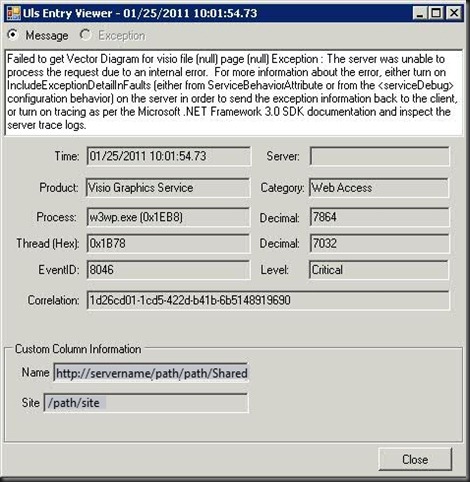
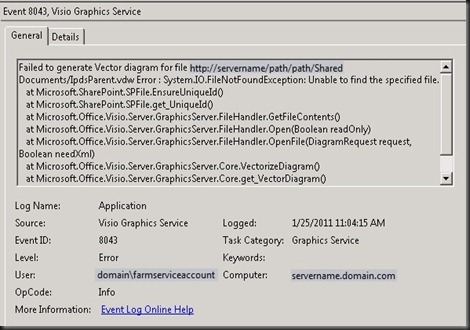
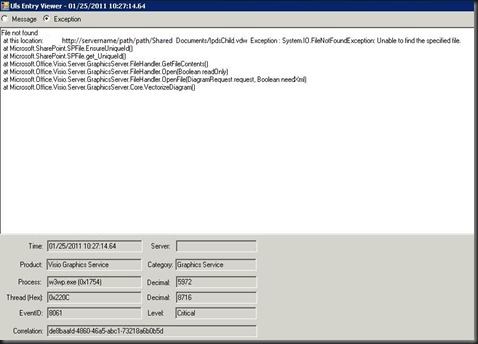
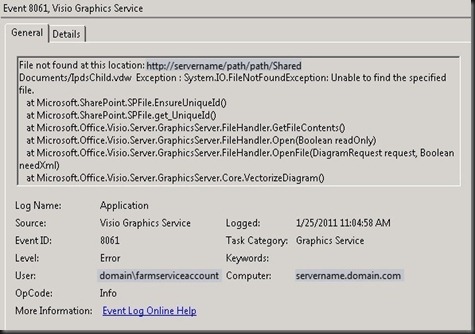
    Getting EventIDs 8061 & 8046 in your ULS Logs and Event Logs on your application server?  Having trouble figuring out exactly what they are trying to tell you?  Finding inconsistent results between site collections?  Let’s dive in…

    Here are the offending errors:
    2

    screenshot.142

    1

    screenshot.143

    TechNet tells us: quoting directly from the article linked here

    Symptoms:   One or more of the following symptoms might appear:

    • A file or files might not load.
    • This event appears in the event log: Event ID: 8061 Description: File not found at this location: <file location>.
    • This event appears in the event log: Event ID: 8051 Description: Unable to parse file at location: <file location>.

    Cause:   One or more of the following might be the cause:

    • A user might try to load a page that contains a Web Part that references a file that no longer exists or is invalid.
    • A user might try to view a Visio diagram that is corrupted.
    • A user might try to view an invalid Visio diagram.

    Unfortunately this really doesn’t help you identify what the problem is or how to resolve it.

    Here is what I discovered:

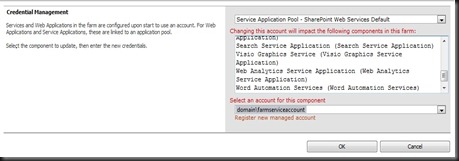
    The common thread is the app pool.  Validate that the app pool that is being reported in the error is the same app pool that is hosting the Visio Graphics Services service. 

    screenshot.136

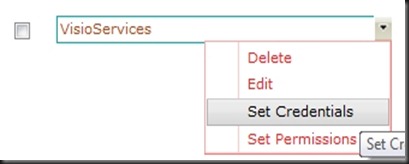
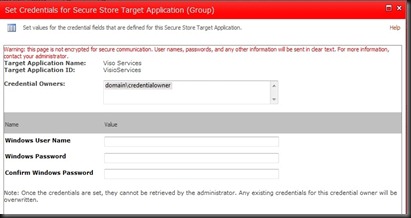
    Next using the visit using the PowerShell script provided in my previous blog article, How to: Get your Managed Account passwords when they are changed automatically by SharePoint 2010, get the password for the account running your Visio Graphic Services and head over to your Manage Service Applications and manage the Secure Store Service.  Find your Visio SSS entry and reset the credentials.

    screenshot.139

    screenshot.140

    Once you have set the credentials you need to recycle the Application Pool on the application server.  In a standard OOB install look in SharePoint Web Services for the site that contains VisioGraphicsService.svc and view the basic settings to determine which app pool is being used by the site and recycle it.

    After this is complete you should see all of your Visio Graphics Services rendering correctly.

    Why the inconsistent behavior mentioned at the beginning of this article?  If you create a site after the SSS credential is invalid and you have a site that is still holding a valid SSS token then you will see one site (the new) be broken and one site (the old) working perfectly.  Just one of the fun anomalies we get to experience in the field.  

    Once again, another issue finds it’s root cause in credentials management.  While SharePoint 2010 has brought us leaps and bounds further than any product previously released, we still must remain vigilant in our credentials management as Admins and Architects.  IMHO, Planning for proper credentials management is almost as critical as DR planning, and often time more far more complex.

  • The definitive BCS in SharePoint 2010 book now available

    My friend and colleague Scot Hillier has just published his new book with his co-author, Brad Stevenson, called “Professional Business Connectivity Services in SharePoint 2010”. 

    Scot brought me a copy today and from the brief bits that I have had an opportunity to read so far (plus what I was privilege to review prior to the printing), it far exceeds the expectations one might have for simply being THE BOOK (yes I know there is only one out there) on BCS.  Scot targets the book to C# developers, but even a simple admin/architect type like me is able to understand and follow Scot’s easy to read style of writing and grasp the concepts.

    As the “stereotypical SharePoint admin” model punching bag for Scot’s presentations I may be a bit biased as I get to work with this talented guy on a regular basis, but I highly recommend you invest in this book, available in paperback or e-book, and give it a thorough read.  Chapter 8 on “Working with BCS Security” and the details he gives around Secure Store and Claims Authentication make it worth the investment alone for us admin types.

    Shameless Plug (as though this whole post wasn’t already!)
    Buy Scot’s book from the publisher or from Amazon.com and support his good work.

  • How to: Fix the "Unable to access SharePoint sites from the localhost" problem

    Ever try to access a page on your SharePoint site from your web front end only to get prompted for a login that never lets you through?

    The issue happens when dealing with sites that Integrated Authentication and have names that are mapped to the loopback address.  Translation:  if you are using Windows with Claims or Classic Mode web applications  and you are trying to connect from the server, this is you.

    The LoopbackCheck security feature is enabled by default on Windows Server since 2003 SP1 and since most SharePoint Farms are going to have an FQDN AAM or two, this is going to be something that many admins are going to run into.

    There are two options, and as in most scenarios one is easy and the other is the right way.

    Option 1. – create a Multi-String Value that has all of your AAMs for the server and restart the IISADMIN service.

    Option 2. – disable the LoopbackCheck on the server

    The Microsoft recommended option is #1 (I happen to agree), however you have to do this on every server (however if you have access to create and modify GPOs, this should be something that you can just have centrally managed for all SharePoint WFEs) and you need to have the list of all of your AAMs handy with which to do it.  Not a ton of work, so bite the bullet and update the registry entry.

    Serious caveat:  Option 2 is great if you are working on a developer vm or something to play with for a short burst, but if you are going to put something in production, please protect yourself and allow Microsoft to do the same.  This is one of those security scenarios where they are putting a validation check in place to protect you from malicious attacks.

    For the more detailed steps on making the changes visit the KB article and get it from the horse’s mouth.

  • Update: PowerPivot in Windows with Claims Authentication on SharePoint 2010 case

    We had a second great discussion with Lee Graber and Venky Veeraraghavan and our MS Account Team today.  They are actively working on getting a solution to allow PowerPivot to work with Windows Claims Authentication in SharePoint 2010, as I talked about in my previous post.  They are expecting to down select an approach, from 4 down to 1, by the end of the week and give us an update on what the timeline will look like.This has been a great experience working with the two product teams, SharePoint and PowerPivot.  Everyone at Microsoft is very dedicated to getting a solution that will not only work for this one customer (us), but for the general population as well.I will update again once I have more to report!

  • All PowerPivot Features supported only in Classic Mode Authentication

    Surprised?  I was this week as well.  I have had a case open with Microsoft since October that we have been playing with back and forth trying to figure out why automated refreshing of a PowerPivot workbook wasn’t working.We let the case go off and on for a quite a while because in the opening days we found that if we ran the PowerPivot Service Application Pool in the context of the farm admin account, that manually refreshing the data would work.  Having a work around in hand threw this issue to the back of the queue for a while.

    After much diagnosis, discussion, and many weeks of thinking that the Secure Store Service wasn’t working properly, along came a very simple explanation: PowerPivot requires Classic Mode Authentication.  FBA and Claims are not supported for doing data refresh or usage data collection scenarios.

    The answer to our question came via 3 references:

    PowerPivot Data Refresh – Everything you always wanted to know  – Page 14 is a good place to start.  Section called “Anatomy of PowerPivot Data Refresh” – written by Mariano Teixeira Neto

    Plan PowerPivot Authentication and Authorization – “To support data refresh and usage data collection scenarios, PowerPivot for SharePoint requires Classic mode authentication. PowerPivot requires a Windows domain user to be the identity behind the SharePoint security token, which it will use to create a history of user activity and document ownership, and to connect to external data sources during data refresh.” – quoted from Technet

    Why PowerPivot requires ‘classic-mode’ web applications – “The second one (i.e. ‘b’ above) is a bit trickier and it is the core issue for this blog entry. In PowerPivot, when connecting through our front-end web services (aka, the PowerPivot Web Service, or PWS in our architectural design) the underlying protocol is the same as the one that earlier versions of Analysis Services used for the ‘data pump’ feature (http://technet.microsoft.com/en-us/library/cc917711.aspx). That protocol does not know about claims – it relies on getting a Windows identity.” – quoted from Dave Wickert, aka PowerPivotGeek

    One of the answers that we got regarding this is that PowerPivot is a part of SQL Server 2008 R2 and not a part of SharePoint 2010, so it wasn’t really a SharePoint authentication problem.  ((Does that sound right?))

    We have gone back to Microsoft and are looking to see if this is something they are going to be able to fix so that Claims Based Authentication can truly be the end-all-be-all solution that we are all hoping that it can be, or if this is just one of many things that we are going to run into that aren’t yet supported in CBA mode.  For those keeping count we are now up to 2 major issues that have come back to CBA as the root cause, the other being the Site Directory issue (which we are still waiting to hear if they are going to accept our hotfix request or not… last update from the engineer was yesterday).

    I have to give a ton of thanks to the MS TAM (Mike Mitchell) that I work with, the engineer (Jason Haak) who worked on this case with us, and the 2 guys who seem to be the experts in the world on PowerPivot, Dave Wickert and Lee Graber.  We spent so much time focused on the technology of the platform and how cool PowerPivot was to work with, that we forgot rule #1 (which they kindly reminded us of)… RTFM.


     

  • How to: Get your Managed Account passwords when they are changed automatically by SharePoint 2010

    Scenario:

    Using Managed Accounts the way that SharePoint 2010 is designed you allow SharePoint 2010 to manage your password changes automatically for you. Your farm gets into an inconsistent state, or you allow SharePoint 2010 to change your farm admin account and you realize that you cannot start the UPS without knowing the farm account password. What do you do?

    Resolution:

    Run the following PowerShell command from the SharePoint 2010 Management Shell as a Farm Administrator:

    function Bindings()
    
    {
    
    return [System.Reflection.BindingFlags]::CreateInstance -bor
    
    [System.Reflection.BindingFlags]::GetField -bor
    
    [System.Reflection.BindingFlags]::Instance -bor
    
    [System.Reflection.BindingFlags]::NonPublic
    
    }
    
    function GetFieldValue([object]$o, [string]$fieldName)
    
    {
    
    $bindings = Bindings
    
    return $o.GetType().GetField($fieldName, $bindings).GetValue($o);
    
    }
    
    function ConvertTo-UnsecureString([System.Security.SecureString]$string)
    
    {
    
    $intptr = [System.IntPtr]::Zero
    
    $unmanagedString = [System.Runtime.InteropServices.Marshal]::SecureStringToGlobalAllocUnicode($string)
    
    $unsecureString = [System.Runtime.InteropServices.Marshal]::PtrToStringUni($unmanagedString)
    
    [System.Runtime.InteropServices.Marshal]::ZeroFreeGlobalAllocUnicode($unmanagedString)
    
    return $unsecureString
    
    }


    Get-SPManagedAccount | select UserName, @{Name="Password"; Expression={ConvertTo-UnsecureString (GetFieldValue $_ "m_Password").SecureStringValue}}
    
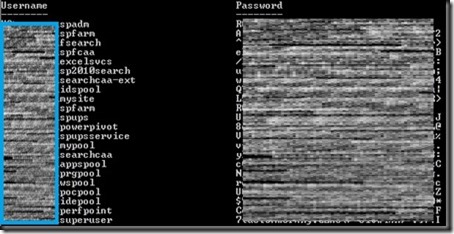
    The output will look similar to:
    screenshot1
    Special Thanks:
    Huge thanks to Microsoft for unveiling this nugget to us during a recent call to SharePoint CritSit support. Derek Martin, of Slalom Consulting, and my jaws collectively hit the floor when they showed us this one and we knew we couldn’t keep it to ourselves.
    Update: Thanks to Todd Klindt for pointing out that the Live Writer Add-in that I have been using makes the code easily readable, but horrible to copy. Download the .ps1 file from here or the text file version from here rather than trying to copy from above and save yourself some time.
    powershell notepad