Author: jhimmel

  • Heavy Metal PowerPivot Redux Deck from BASPUG meeting is now online!

    My friend and co-mischief maker, Cornelius J. van Dyk, & I were honored to be able to present last night at the Boston Area SharePoint User Group, and as promised below you will find a link to our deck.  Thanks to everyone who came out to hear us speak!

    Heavy Metal PowerPivot Redux

    BASPUG

  • SQL Server 2012 Announcements & a new Blogger

    The big news of the day in the technology world… no, not the Blackberry outage… no, not iOS 5 being released…  the big news about SQL Server Code Name: “Denali” becoming official SQL Server 2012!  Product release is slated for the first half of 2012 (not specifically Q1 as many of us had hoped)

    Project Crescent has been rebranded as Power View and announced that there will be a browser based version that will work on iOS & Android devices, but will not be full function.  The other great thing is that the story board to PowerPoint functionality was stated to be in the RTM release.

    Project Juneau has been rebranded as SQL Server Data Tools as well.

    The other big news is that my great friend, Dave Feldman, that I have quoted here on a number of occasions, is a co-creator of SPFLogger, and one of the smarter Microsoft BI & general troubleshooters that I know has finally started a blog.  Check out his take on the announcements from SQL PASS as well as some videos that he was able to get posted from the keynote.  His new blog is http://bostonmusicdave.blogspot.com

    Lastly, you can check out the Official Press Release from Microsoft, the SQL Server 2012 Analysis Services information, the SQL Server 2012 Reporting Services info, and the SQL Server 2012 Enterprise Information Management info for updated information.  SQL Pass’s site is also a resource, but I have found that following @MicrosoftBI and @SQLServer on twitter have been more useful thus far.

    More BI goodness when I hear it!

  • Presenting “Heavy Metal PowerPivot Redux” tonight at BASPUG

    My good friend, Cornelius J. van Dyk, & I are presenting one of our favorite topics at the Boston Area SharePoint User Group this evening, Heavy Metal PowerPivot!

    For those of you who have seen us present this topic in the past, you might be asking “ok, I’ve seen it before, why should I attend?”.  The answer is simple: SQL Server 2012 CTP3.  We will be demoing the new installation experience as well as a few of the new features that are coming in the update to this amazing product.

    We hope you will come out and join us for this deep dive into the existing version and a glimpse into Denali.

    Our friends at BASPUG would like me to mention that you can/should register for the event at http://baspug18.eventbrite.com/

    BASPUG

  • SharePoint/Office 2007 Service Pack 3 coming Q4 2011

    The Office Sustained Engineering Team has announced that Service Pack 3 (SP3) for Office 2007 & SharePoint 2007 will be coming some time during 2011 Q4.  This appears to be the last major update to the 2007 client & server stack as the team states:

    “We are offering this release in preparation for the April 2012 end of mainstream support for the 2007 client and server products. The October 2011 release provides a 6-month window to test and deploy the release prior to exiting mainstream support.”

    The Service Pack will be a roll-up of all prior 2007 Cumulative and Public updates since Service Pack 2 plus some new hotfixes.  As always with the SharePoint 2007 world, you will need to install the WSS update before the MOSS update.  There is not a planned or expected CU requirement following the SP3 installation. 

    To quote the article directly:

    “SP3 will include changes in the following areas:

    Office Client 2007 Suites
    Office SharePoint 2007 Servers
    Office SharePoint Search Server 2007
    Office SharePoint Designer 2007
    Office Project 2007
    Office Visio 2007
    Office Proofing tools 2007
    Calendar Printing Assistant for Outlook 2007
    Office InterConnect 2007
    Office Compatibility Pack
    PowerPoint Viewer
    Visio Viewer
    Office Servers Language Pack
    Windows SharePoint Services 3.0
    Office Access Runtime and Data Connectivity Components”

    Soapbox time!!!!

    upgrades

    As always, please plan to test your upgrade plan in your Development/Test/QA environment prior to ever consider installing in Production. 

    Keep in mind that if you only have a Production environment, you really only have a testing environment.  Now is a good time to start updating your resume if you haven’t and you are even thinking about heading down an upgrade path. 

    Consider spending as little as $50 a month with a company like CloudShare to get a testing environment.  They have a great pre-production hosting option that will allow you to validate your scenarios without having to invest a ton of capital to do it.

    NOTE: Best Practices for installing SharePoint 2010 Service Packs and updates changed as of August 31, 2011 according to the Update for SharePoint 2010 Products page

    “As a result of the new packaging, it is no longer necessary to install the SharePoint Foundation cumulative update and then install the SharePoint Server cumulative update.”

    Keep an eye on this, the story has now changed and then changed back since RTM.

  • How SharePoint Governance is like a moose in a swimming pool

    I was watching the news last night and a story came on about a man in Manchester, NH (about 30 minutes from my house) who heard a noise that was coming from his backyard, and when he turned on this lights he found a Moose in his backyard.  The moose was spooked by the sudden flood of light and charged through his fence and directly into the man’s swimming pool.

    moose

    The man from didn’t have many options going in to the situation, it just descended upon him from nature and he was forced to simply deal with the situation.  He went from having a nice quiet evening at home to needing help from 12 people to get a moose out of his pool, having a shredded pool cover, and ending up with his saga documented on the evening news.

    How this relates to SharePoint

    Lying in bed after fasting all day for Yom Kippur, the Jewish day of Atonement, all I could think was how similar this man’s scenario was to all too many deployments of SharePoint: Someone hears something, starts to investigate, the next thing they know they have a 2000 pound angry animal on their hands.

    In our many cases we have the ability to hold off the animal and redirect its efforts into something more productive and healthy with governance and proper planning, however many times the beast barrels through our defenses and we are dealing with a world of trouble that we didn’t intend on.

    The man in the story had many options:

    1. ignore the situation and hope it clears itself up
    2. grab a gun and shoot it himself
    3. call a local hunter to deal with it for him
    4. calmly call the police and figure out how best to deal with the situation with expert assistance

    I sincerely hope that when faced with situations like this we deal with things as well as the man from the news story did because in the end, all that was really lost was part of a fence, a $200 pool cover, and some time.

    Here are a couple of things to keep in mind, whether you are dealing with an angry moose, or an impending SharePoint deployment:

    1. Find out what you don’t know
    2. Stop and determine the correct plan of action before proceeding
    3. Understand what the drivers of your situation are
    4. Get control over an out of control situation

    When it comes to SharePoint deployments, whether properly conceived or not, it is always best to stop and examine your options.  It is always going to be best to take a bit of time up front to save a complete rebuild later.

    The moral of the story

    When cooler heads prevail, everyone comes out alive, and with a reasonably interesting story to share.  Think before you act, and in our world, before you implement.

  • SharePoint Network Topology Diagram Add-In

    This was referred to this morning in the keynote at SharePoint Conference 2011 and appears to be a really cool solution.

    Source: Visio.Microsoft.com

    “SharePoint Network Topology Diagram Add-in leverages Visio Services to deliver a near real time intuitive rendering of the status of SharePoint farm’s infrastructure and associated services. Visio Graphics services – A key part of SharePoint 2010, enables customers to share their dynamic data driven Visio diagrams and dashboards within SharePoint. This helps extend the reach of valuable information and insights across relevant teams within the enterprise for capacity planning and general IT maintenance.

    The timer job fetches all the key technical metrics about the SharePoint farm infrastructure using SharePoint object model and WMI (Windows Management Instrumentation). It’s frequency can be adjusted based on specific administrative needs. The timer job creates a SharePoint list that is linked to a Visio diagram. A client add-in helps you generate, customize and link the output of the timer job to a Visio diagram by using a wizard driven interface.

    Upon publishing the Visio diagram within SharePoint, Visio Services enable users to refresh their diagram from within SharePoint.”

  • When was the last time I deployed that SharePoint solution?

    Ever have trouble remembering when you last deployed a specific solution?  Now, none of us would ever allow an environment to be uncontrolled and let people willy-nilly install solutions, but in the real world sometimes things slip through our well controlled documentation and we need a hand.

    For those of us with more than 5 farm solutions hunting and pecking for the last installed date can be problematic.  One of my colleagues (at this point I am forgetting who, so if it was you take a bow) helped me write a script to grab the information from SharePoint.

    Here is the script:

    a

    This will output the information to a text file on your C: called solutionlog.txt.  Remove the “ >> c:solutionlog.txt “ and it will display onscreen like this:

    b

    If you are in an environment that has continuous integration coming out of TFS or another like service, you can schedule this and have it email you the output on a regular basis. 


    spflogging

  • Apples and Mangos and Raspberries, oh my! A fun day of fruit…

    I spent a good portion of my day watching phones update today.  

    My iPhone 3GS had finally ground to a halt and I decided to go back to baseline and reimage it.  It took almost 2 hours for my iPhone to reinstall the base iOS and restore a backup, but at the end it is performing like a new phone.  I highly recommend doing that every 6 months to improve performance of your iPhone.a

    The really big news of the day however was that Windows Phone 7.5, affectionately known by everyone in the world as Mango, dropped today.  I spent all day checking my phone to see if I was one of the lucky who would be graced with the update sooner rather than later.  Sadly, I was not.  Not until after posting a sad message in response to Andrew Connell’s jubilant Facebook message saying that he had just gotten Mango installed did I find that there was a magic trick out there to make Mango appear.

    Reiterated from WPCentral: (proceed at your own risk)

    1. Connect your Windows Phone to a PC and launch the Zune software
    2. Click on Phone/Settings/Update. Allow the software to tell you whether an update is available. If so, skip this guide. If not continue to the next step.
    3. Click the update button again, and this time immediately disconnect your computer from the internet (some people have better luck waiting 1-2 seconds). Do this by pulling the Ethernet cable, disabling Wi-Fi, disabling your NIC, etc.
      1. I had the best luck disabling my NIC.  Trying to get the cable unplugged in just the right amount of time was proving tedious
    4. Wait 30 seconds or so and you should receive a notification that an update is available. This is 7392, the Mango pre-update.
    5. Now reconnect to the internet and continue with the update process through the Zune software.
    6. After 7392 is fully installed, you may receive a notification that another update is available. If so, install Mango now. If not, proceed to the next step.
    7. If the second update isn’t popping up on its own, repeat steps 3-5, causing the 7403 update to appear.
    8. Install 7403.
    9. Mango time! At this point, Zune should automatically start installing 7720, Mango. If it doesn’t happen automatically, force it like in previous steps.

    b 

    The entire process took about an hour and a half and I am very excited to go play with my new toy, as all of my developer friends have been flashing their pre-release bits in my face for some weeks/months now.

    Oh, the raspberries… they were a part of dinner.  I just needed a third fruit for the alliteration.

  • Breaking the silence–a personal note

    Some people have noticed the unusual lull in my posting.  Others are probably wondering why in the world they are still reading after the title doesn’t have anything to do with SharePoint.

    The out of the norm silence is due to several things happening in my personal world, which I normally try to keep out of my blogging, but since this has a direct correlation to my SharePoint community involvement I have decided to share it here.

    Since my vacation at the beginning of July I started to recognize that my involvement in the community and my desire to be more involved in SharePoint not just inside of my employer were not well aligned with my current career path.  My employer, while supportive, was not overly interested in my SharePoint community involvement and combined with other internal factors I realized that it was time for me to consider my career options.

    Like anyone who is considering a major life change I turned to my friends and family for advice, but I also reached out to my friends and trusted advisors in the SharePoint community and the response was overwhelming.  The support and advice that I received from colleagues around the community was amazing.  I am hard pressed to think of another group of professionals that are as impressively supportive and helpful of people (that they may have never actually met in person) as the SharePoint community.

    With the decision made that it was time for a change, I returned home to find a new SharePoint Users Group was starting in my area and I immediately dove in.  Now one of the organizers for the group we have made strategic moves to improve the community interaction here in New Hampshire, such as moving the meeting date and time out of conflict with our sister User Group down in Boston and getting some top quality talent to come and speak to our members.  We have also gotten sponsors for raffles, giveaways, and a new SharePoint Foundation 2010 site hosted by FPWeb.net that will come online later this month.  For more information about NHSPUG visit our site at http://www.granitestatesharepoint.org/

    I also got involved with SharePoint Saturday New Hampshire, which is this coming Saturday, September 24th in Manchester, NH at the Southern New Hampshire University Campus. You can still register for SharePoint Saturday New Hampshire by visiting our site at http://www.sharepointsaturday.org/nh/default.aspx

    All of that made me feel great and really reconnected me with the community, but I still had to figure out what I really wanted to do from a career perspective.  That’s where LinkedIn came in.  I have always seemed to get between 5-12 linked in requests per week from recruiters and always ignored them.  I decided that it was time to hear what some of them had to say.  So I responded to 5 of them.  Almost instantly I got a call from a woman named Debbie Strevens from Workbridge Associates who claimed to have connections to every person in a power position in the Greater New England area and would find me the exact right for for me.  I chuckled a little bit internally after the call thinking, “Wow, she has some pitch but there is no way she can be for real.”  Turns out, she was. 

    A few months prior I had gotten some great advice from Christian Buckley of Axceler, whom I have come to respect and value as a friend and community contributor (and hopefully soon to be SharePoint MVP), which was “Sit down and write my own job description.  Before you look for a new career opportunity, know what you want.”

    I gave my job description to Debbie and in just under two weeks I had numerous competitive offers.  After much soul searching and long discussions with my wife I accepted an offer from Sentri, Inc. to be their new SharePoint Practice Director.

    While it was hard leaving what I had put my blood, sweat and tears into at my previous employer, I have been warmly embraced by Sentri and am truly excited to be working with a dynamic organization that is whole heartedly committed to Microsoft technology.  Sentri’s president, Philip Green, is famous for saying “At Sentri we put all our eggs in one basket, Microsoft Software.  Fortunately, this is one very, very safe basket.  We are Microsoft Technology Experts.”  It’s a pretty compelling statement to someone who has dedicated their career to Microsoft Technologies.

    Sentri has embraced and is fostering my commitment to the SharePoint community, encouraging my blogging (which will be cross posted on the Sentri site soon), speaking, and activities with the User Groups and SharePoint Saturdays.

    I am excited to be on a new career path that will allow and encourage me to follow my passion.  Expect more regular & diverse content in the weeks and months to come.

  • What is MaximumFileSize limit set to on all of my Web Apps? Now that I know, how do I change it?

    I ran into an issue today where I needed to quickly pull the MaximumFileSize setting for every web application across my farms.  I found lots of blogs that told me how to change the setting, but none that told me how to pull the information from the farm before I change it.

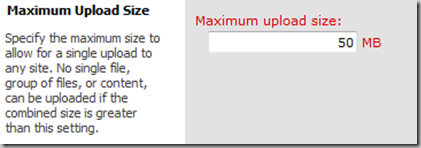
    The UI method for this is simple, but cumbersome if you have multiple web apps and multiple farms.  Simply go to Central Administration|Application Management|Manage Web Application and select the Web Application you want to look at.  In the ribbon the General Settings button will light up and when you click on it you will get the menu that includes:

    a

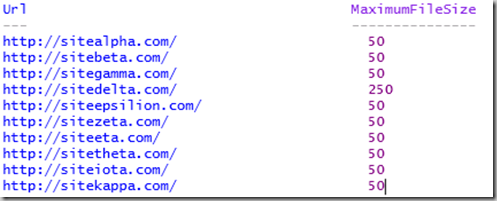
    That great for single scenarios.  I wanted a PowerShell option that would loop through every one of my web applications and give me a list that I can store, and also will give me a quick way to audit if someone has made an unauthorized change.  Here is what I came up with:

    b

    The output looks like:

    c

    In a DevQA want all of my sites to have the same file upload size limit, so I can use the following script to set them all the same:

    d

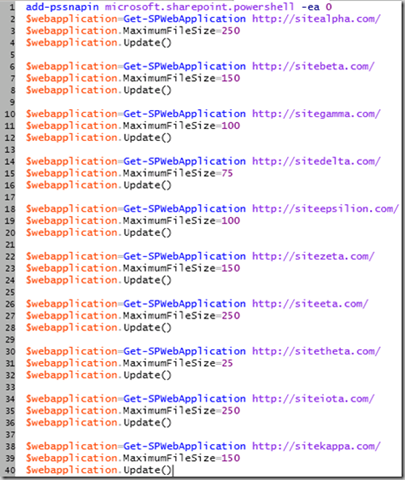
    In a Production environment I want to have different upload size limits based upon what the function of the Web App is, so I will use a script that allows me to change the limit on each specific web app:

    e

    Why all the “add-pssnapin microsoft.sharepoint.powershell –ea 0”?

    Easy answer to this is that I am generally the numbskull who forgets to pop open the correct PowerShell console (SharePoint 2010 Management Shell) on a server that I don’t usually log into, or I am using PowerShell ISE and haven’t configured a profile.  The –EA 0 flag allows me to throw the command to load the snap-ins without errors showing up if they are already loaded.  Makes for a cleaner overall experience.