Author: jhimmel

  • Hooray, it’s a book!: “Developing Business Intelligence Apps for SharePoint”

    book

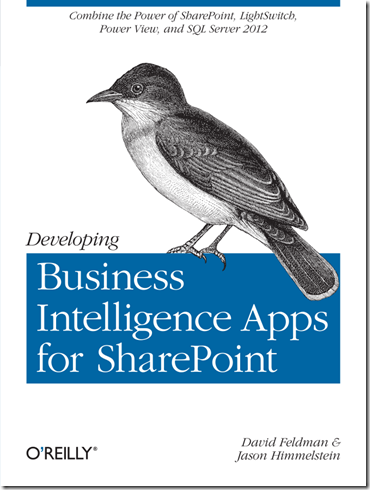
    Over the past year I have been spending my night’s & weekends working on a book with my co-author, Dave Feldman, and I am proud to say that we have completed our draft of “Developing Business Intelligence Apps for SharePoint”

    Through the book you will learn to create dynamic Business Intelligence solutions for SharePoint, using Microsoft Visual Studio LightSwitch, SQL Server 2012, and other tools and technologies. This hands-on book shows you how to create data-rich BI applications with SharePoint faster and with more capabilities than previously possible. You’ll learn the entire process, from high-level concepts, to low-code development and deployment, to setup and configuration.

    • Quickly build a robust schema and applications with Visual Studio LightSwitch
    • Leverage PowerPivot v2 to build a business intelligence semantic model
    • Create reports with Excel Services, Report Builder, and Power View

    The happy thing about our book is that we saw the CSOM model of SharePoint 2013 coming down the road and architected our solutions in the book so that they are relevant to both the 2010 & 2013 platforms (and hopefully many versions of SharePoint to come).

    The book is available for pre-order on Amazon now and will be available via O’Reilly Early Release.   Dave & I will be at the SharePoint Conference in Las Vegas where O’Reilly will have a form of the book available (not quite sure if it will be a few chapters or what at that point, but there will be something!). 

    I will say that Dave & I were warned by Andrew Connell & Scot Hillier when we started talking about writing this book that taking on a book project is much like having a child.  9+ months of long uncomfortable sleepless nights to give birth to something that you hope goes on to do good things in this world (I am paraphrasing a bit here… basically they both said it was going to suck something awful, but we would be happy when it was all over).  Well gents, you were right on all counts.  The fun part is that while I have 2 kids and sort of had an idea of what something like that was going to be like, Dave’s wife is pregnant with their first child and is due this SUNDAY.  Needless to say, we are glad to be done before Baby “Cookie Monster” Feldman arrives. smile

  • Planning a SharePoint Saturday: A recap of #SPSNH

    We are now almost a month removed from SPSNH and it has been just enough time for the glow to start to fade and for life to start getting back to normal.  The event was wildly successful and somehow managed to receive nothing but positive reviews.  There were a few things that I noted that are worth mentioning:

    1.) Drop off between registration and attendance was between 30-40%. 

    2.) Doing 6 keynotes instead of 1 made the day interesting, but did not draw people in for the early sessions the way that a big name keynote might have.

    3.) Planning 3 tracks (ITPro, Dev, End User) at 2 different skill levels (Beginner & Advanced) and keeping the tracks consistent in the same room so that people weren’t hunting for their next session was a BIG hit.

    4.) Todd Klindt is a freaking rock star.  This isn’t something that we learned, but it was certainly reinforced.  The dude stepped up to deliver a session he had never seen until 5 minutes before when someone called in sick for the first timeslot & then presented to a standing room only group later in the day.  Todd’s heroic efforts win the booby prize with Chris McNulty coming in a close second for taking on an extra session with only a day’s notice.  The edge went to Todd because he had less prep time. 

    5.) Bags and paper collateral are passé.  Give people a jump drive with digital collateral.

    6.) Varying things up between 2010 & 2013 was very positive.  The people who came to hear about 2013 wanted some 2010 as well & the folks who wanted to hear about 2010 were interested in some about 2013 too.

    7.) Hot coffee available all day is a MUST.

    8.) Speaker gifts instead of speaker shirts.  We gave a nice warm jacket with the SPSNH & NHSPUG logos on them and I am still getting twitter comments about how much the speakers enjoy them.  Plus, SPSRED “borrowed” our idea and their speakers loved them too smile

    All in all, I am happy to say that SPSNH was a great success and we are looking forward to doing it again next year.  There are things that we will look to do differently, but with a second SPSNH under our belt I think that we have a pretty good thing going up here in the “Live Free or Die” state.

    My presentation from SPSNH can be found here. The slides that Todd presented on 5 minutes notice can be found here. (I had done a webinar the week before, so this was my deck from that)

    My pictures from the weekend can be found here on my SkyDrive.

  • 250 USB drives to load? WHERE IS MY POWERSHELL CAPE???

    In preparation for SharePoint Saturday New Hampshire I had to load 250 USB drives with sponsor’s digital collateral. The fun last evening was getting all of the little buggers out of their individual boxes and sealed plastic wrappers in order to make loading them a bit faster.

    Today I ran out to Best Buy and purchased a pair of Belkin 7-Port USB 2.0 Powered Hubs and then sat down to “borrow” some PowerShell commands from someone on the interwebs. Sadly, I did not find a quick pre-canned script that would let me loop through my USB sticks and load them with the data. Here is what I needed my script to do:

    1.) Change the name of the USB Drive to “SPSNH 2012”
    2.) Copy the files and folders from the location on my hard drive to the USB Drives
    3.) With a single trigger, perform the above functions on all drives inserted in the machine

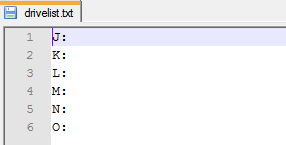
    In order to accomplish this I created a drivelist.txt file. Very simple text file with the list of drive letters that I were assigned to the drives when inserted. One key tip here is to make sure that there are no extraneous carriage returns after the final drive letter (this will cause an error later). The contents of the text file look like this:

    1

    Next I created a PowerShell script that utilized the WmiObject, WmiInstance & Item command-lets and threw in a foreach loop. The script looked like this:

    2

    Using this script, 2 computers & the 2 Belkin hubs I was able to load all almost 100meg on to 250 drives in just under 2 hours with distractions. Not too shabby.

    I also created a second script for USB drives that are larger than 4GB that will reformat them as NTFS (or whatever format you choose) so that you can load larger files onto them, then rename the drive & copy the files in. Here is what that script looks like:

    3

    Hopefully this will be useful for others in the future. I would not want to be loading these things up without some form of script to assist. Below you can find a plain text version of each of these scripts that you can download and use yourself.

    notepad USB Drive rename & copy script (FAT32)

    notepad USB Drive format, rename & copy script (NTFS)

  • SharePoint Saturday New Hampshire is upon us!

    speakerbadge_newhampshire_2_4C4297A5

    With only 3 days to the big event things are rapidly coming together.  The bags, speaker gifts, t-shirts, buttons, digital collateral, prizes and jump drives are all here and ready for Saturday.  I am excited for my presentation “ITPro’s taking the SharePoint 2013 “red pill” will be a ton of fun to present and should be informational as well. 

    More than anything I am excited that my co-organizers and I have been able to assemble an amazing cast of speakers to come out to New Hampshire and talk about SharePoint on their own time.  We have speakers coming from Texas, Iowa, Indiana, Washington DC, and all of the New England states to share their expertise with our attendees for free. Being a regular speaker at SharePoint Saturdays for the past year and a half I take for granted all of the hard work that goes into these events and all of the people who give freely of their weekends to come out and speak at these events; it could partly be, as my colleague Mike Gilronan likes to tell people, because “Wherever there are two or more people asking about SharePoint, Jason feels obligated to show up and talk”.

    I have really enjoyed helping to put this event together and am excited to see our efforts come to fruition.  If you are in the New England area and want to learn about SharePoint, please find your way up to Southern New Hampshire University on Saturday.  You won’t regret it!

    To learn more and register to attend this FREE SharePoint training please visit http://www.sharepointsaturday.org/NH

  • Getting PowerPivot & Power View working in Office 2013

    One of the many exciting features of Office 2013 is that PowerPivot now comes as a part of the installation & Power View is now available in the client for Excel 2013 , rather than being an post installation add-in for PowerPivot and web resident only for PowerView.  PowerPivot is still a COM add-in, but is not more tightly integrated with the product & Power View is now a COM Add-in.

    I upgraded to Office 2013, removing the 2010 version, on Monday night and immediately I was faced with a problem.  PowerPivot showed in the ribbon, but was not clickable! After attempting to click in the greyed out bar for about 5 minutes I started digging in.  I found that PowerPivot was active in the Add-ins section, but something didn’t seem quite right:

    1

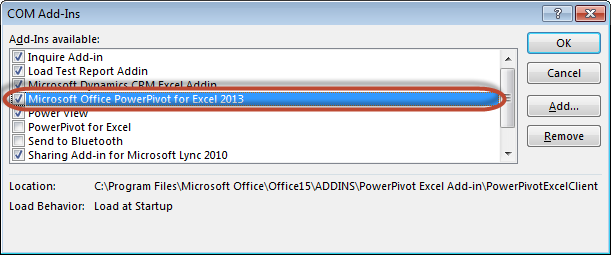
    This Add-in was the SQL 2012 version.  Once I unchecked this and went back to the Add-ins section I found the newer version of PowerPivot was now available.  There was a conflict with the older version blocking the newer version from being able to be activated.

    2

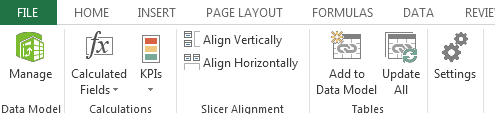
    Once I checked “Microsoft Office PowerPivot for Excel 2013” (and Power View since I was already here and excited to check it out) the Manage option in the ribbon lit up and I was off to the races.

    3

    Since I still need to do work with PowerPivot v2 models and am not willing to upgrade everything to the beta version yet, I did re-install Office 2010 and now have the fun experience of two PowerPivot tabs in my ribbon in Excel 2013 (doesn’t happen in Excel 2010), but if I disable the older version of PowerPivot in 2013, it disables it in 2010 as well. 

    4

    5

    I have yet to have an issue with having both add-ins active at once since reactivating the older version, as the active add-in is the only one that lights up.

    6

    More to come on the great new features of PowerPivot, Power View and Inquire, but for now its time to get back to my vacation smile

  • SharePoint 2013 Unveiled!

    It is a very exciting day to be in the SharePoint space!  We have been speculating and anxiously awaiting this day for a long time, and of course it happens when I am out on vacation! smile

    I got the news the the veil was lifted while at lunch and have been anxious to get back to my keyboard ever since.  There are so many great new features in this release that I am going to hold back from trying to put everything into a single post, so here are the high points for me based on what I have parsed in the public offering:

    1.) Architectural changes in SharePoint 2013

    a.) Claims first.  The default for SharePoint 2013 web applications will be in Claims-based Authentication.  Classic mode will still be supported, but Classic mode authentication web apps will have to be created through PowerShell.  Does this mean that Microsoft will finally support 100% of the features in SharePoint 2013 under Claims?  I am betting on it.

    b.) Office Web Apps moves out from under the SharePoint umbrella and takes on a life of its own, giving the ability to share Office docs on the web in more than just SharePoint.  Moving to its own architecture, that cannot be hosted on the same servers as SharePoint, gives it scalability and credibility that Microsoft is investing in this model.

    c.) Search becomes unified.  There is no longer multiple versions of Search for SharePoint.  Many exciting things to uncover in this space, especially when leveraged with Office Web Apps, however the topology requirements grow considerably.

    d.) The new Distributed Cache Service. Scale points have not yet been determined, but expect more data points on this during the Beta release.

    e.) Server requirements changes. The big surprise here is that there are no changes to the minimum hardware requirements for the servers.  The only real change here is in that Windows 2008 R2 SP1 is the minimum software platform and SQL 2008 R2 SP1 is the minimum database platform.  64bit is required across the board.

    f.) Web Analytics changes.  They have gutted the model used for SharePoint 2010 and have made massive improvements, including considerations for scaling and impact on SQL & IO.

    g.) Work Management Service.  This is one of the biggest features for end users in this version of SharePoint.  WMS provides us with out of the box task aggregation from SharePoint, Exchange, and Project Server with additional systems that could be added later.  Due to the nature of the model, I expect that this will be extended by third parties to hopefully include many other systems driving SharePoint to be the one place to go to manage your day.

    h.) Upgrade gets a facelift.  Visual Upgrade is completely changed for SharePoint 2013 and there are some architectural considerations to be taken into account here.  More to discuss here than what I can put into a partial blog post, but come find me at SPTechCon on Sunday night at the “Meetup with SharePoint Experts” where I will be sitting with Shane Young & Todd Klindt of Rackspace at the Upgrade table and I am sure that we can discuss for hours.

    2.) Social changes

    a.) Massive investment in Social, even before the acquisition of Yammer, have been made in SharePoint 2013 around Microfeeds, Social Lists, Personal sites, a new way of handling personal documents.

    b.) A complete re-architecture around privacy settings &sharing to make the process more intuitive for the user.  Users of SkyDrive are going to find the screens very familiar.

    3.) The new App Model & WCM

    a.) While generally not topics that I write about, I read about them constantly and would recommend that you join me in reading every word that Andrew Connell has to write about these topics.  Not only is AC one of the brightest SharePoint minds I know (Scot Hillier not withstanding), he is also one of the instructors who developed and delivered the Ignite training and the MSDN training that is now available.  Follow AC on twitter at @andrewconnell and on his blog at http://www.andrewconnell.com/blog/

    If you try following him at @SharePointAC you will find Andrew Clark instead, who is a great guy and an awesome guy to take to a bar if you like pre-prohibition cocktails and fun SharePoint dev talk, but ultimately not the same person.

    Now is the time to get your hands on the beta bits and start learning!  Here are a few resources I have found so far from my scouring and a few other posts:

    Builds:

    Microsoft SharePoint Server 2013 Preview

    SharePoint Foundation 2013 Preview

    SharePoint Designer 2013

    Microsoft Office Web Apps Server Preview

    Microsoft Office 2013 Audit and Control Management Server

    SQL 2012 SERVICE PACK 1 (SP1), COMMUNITY TECHNOLOGY PREVIEW 3 (CTP3)

    Reading:

    TechNet: SharePoint 2013 Preview

    Downloadable eBook: Deployment guide for SharePoint 2013 Preview

    SharePoint 2013 for IT pros

    SharePoint 2013 training for IT pros

    Topologies for SharePoint 2013 Preview

    Back up and restore: SharePoint Server 2013 Preview

    Search architectures for SharePoint Server 2013 Preview

    Enterprise search architectures for SharePoint Server 2013 Preview

    SharePoint 2013 Preview: App Overview for IT Pro

    What’s new in business intelligence in SharePoint Server 2013 Preview

    SharePoint 2013: Claims is the new black – by Wictor Wilén

    SharePoint 2013 IT Pro and Developer training materials released – by Vesa Juvonen

    Understanding SharePoint 2013 Apps (aka: Apps 101) – by Andrew Connell

    SP2013 WCM: Forget Everything You Knew About SharePoint WCM! – by Andrew Connell

    You are likely to notice an uptick in blogging from many people who have gone quiet over the past few months (myself included) while we have been working on things we haven’t been able to talk about.  Now that the flood gates are open expect to hear from me more often.
  • Presenting “SharePoint Logging & Debugging: The Troubleshooter’s Best Friend” tonight at NYCSPUG on 3/7/2012

    If you are in the greater NYC area and are looking for a way to put an exclamation point on a great day of geeking out during the Virtual SQL Server 2012 launch, find your way over to the Microsoft offices at the Avenue of the Americas and come hear all about SharePoint Logging & Debugging. 

    Here is the primer:

    Troubleshooting and debugging issues in Enterprise SharePoint farms is a daunting task at best. SharePoint 2010 provides the tools to tackle the task, but not the roadmap. Come and join us as we lift the veil on the new and exciting features in SharePoint 2010, providing the roadmap to save you a ton of time every time you troubleshoot or debug an issue in SharePoint. Reclaim your evenings and weekends once and for all by taming the SharePoint debugging beast!

    There will be food and drinks provided, and a SharePint following the event that promises to be a great time.  I have even heard that there will be some other out-of-towners making an appearance.

    If all of that isn’t enough to rope you in, I will be giving away a Lync certified Plantronics Voyager PRO UC.

    You can also check out my deck here: http://slidesha.re/wxIvNe

    Hope to see you there!

    spflogging_32

  • The SQL Server 2012 Launch is almost here!

    We are a mere 2 days away from the Virtual Launch of SQL Server 2012 and there is a ton of great information & free training (and some pay for) that is primed and ready to go for us to digest. Here is a list of some of the events that you can partake in:

    SQL SERVER 2012 VIRTUAL LAUNCH EVENT

    This is it people! What we have been waiting so long for has finally arrived. There is a full day of speakers in multiple tracks to enlighten us on all that is new and wonderful in this version of SQL Server.

    Date & Time: March 7th, 2012 @ 11a Eastern Time
    Cost: Free
    Registration Link: https://www.sqlserverlaunch.com/WW/Register
    Keynotes: Ted Kummert & Quentin Clark
    Full agenda: http://www.sqlserverlaunch.com/ww/Agenda

    A few of the highlights:

    Powerful Self Service Analysis with PowerPivot

    Julie Strauss

    Empowering End User Insight Through Rapid Data Exploration & Visualization with Power View

    Carolyn Chau

    Going Under the Hood with the New BI Semantic Model

    Ashvini Sharma

    A Technical Best Practices Tour with ColumnStore Index

    Susan Price & Eric Hanson

    Introduction to SQL Server 2012 AlwaysOn, New High Availability Solution

    Santosh Balasubramanian


    SQL SERVER 2012 SPECIAL OPS TOUR

    A 12 City Tour featuring 4 of the SQL Server Product group of highly-skilled experts who have come to divulge the most revealing facts and features around SQL Server 2012.

    Date & Time: Various
    Cost: Free
    Registration Link: http://specialops.sqlpass.org/FreeRegistration.aspx


    24 HOURS OF PASS

    Join SQL Server experts as they take an in-depth look at the hottest SQL Server topics over 24 consecutive (and free!) technical webcasts.

    Date & Time: March 21, 2012 beginning at 00:00 GMT (8pm Eastern Time)
    Cost: Free
    Registration Link: Big long ugly link

    A few of the highlights:

    Performance Tuning for Pirates!

    John Sterrett

    VertiPaq Under the Hood

    Marco Russo

    SQL Server First Responder Kit

    Kendra Little

    Moves Like Jagger – Upgrading to SQL Server 2012

    Mark Broadbent

    Automate Policy-Based Management Using PowerShell

    Allen White


    SQL SERVER CONNECTIONS

    During the Spring Connections Conference in Las Vegas the in-person SQL Server Launch event will be taking place.

    Date & Time: March 21, 2012 beginning at 00:00 GMT (8pm Eastern Time)
    Cost: See website
    Registration Link: https://www.devconnections.com/shows/sp2012/register.aspx?s=185
    Keynotes: Shawn Bice

    A few of the highlights:
    SQL Server Connections happens to be going on alongside Visual Studio Connections, ASP.Net Connections, SharePoint Connections (where I will be speaking), Silverlight Connections, HTML5 Connections, and Cloud Connections.


    PASS SQLSATURDAY

    PASS SQLSaturday’s are free 1-day training events for SQL Server professionals that focus on local speakers, providing a variety of high-quality technical sessions, and making it all happen through the efforts of volunteers.

    Date & Time: Various
    Cost: Free
    Registration Link: http://sqlsaturday.com/

  • PowerPivot & Claims Based Authentication–Is there hope in SQL 2012?

    I promised an update on this in my previous article and it is time to share what I have learned.

    The issue:

    As many of us have painfully found, PowerPivot v1 on a Claims Based Authentication web application is not supported in SharePoint 2010.  I had a case open with Microsoft last year that had the aspirations of rectifying that situation.  We had hoped that working with the PowerPivot team (a part of the SQL Server Product team) and the SharePoint Product team that we would be able to find a way for Microsoft to change their stance and provide us a way to allow PowerPivot v1 to be supported. 

    The answer for v1:

    Sadly, the changes that would have to be made were too drastic for Microsoft to make in the middle of PowerPivot v1’s existing product lifecycle. 

    The new and improved question:

    That begs the question: Is there hope that PowerPivot v2 will be able to work on a Claims Based Authentication web application?

    The caveated answer:

    Keeping in mind that the product has not launched yet and things can still change (they won’t, but lets keep hoping) and that all of the SQL 2012 TechNet that are posted currently have the following statement at the top of them:

    [This documentation is for preview only, and is subject to change in later releases. Blank topics are included as placeholders.]

    The answer is still no.  In the TechNet article entitled “Hardware and Software Requirements (PowerPivot for SharePoint and Reporting Services in SharePoint Mode)” you will find the section under PowerPivot Sofware Requirements says in reference to SharePoint web applications:

    PowerPivot for SharePoint only supports SharePoint web applications that are configured for classic-mode authentication. If you are adding PowerPivot for SharePoint to an existing farm, be sure that the web application you plan to use it with is configured for classic-mode authentication. For instructions on how to check authentication mode, see the section “Verify the Web application uses Classic mode authentication” in Deploy PowerPivot Solutions to SharePoint.“

    Well damn.  Is there any hope that this is ever going to change?

    Keep your chins up.  Rumor in the interwebs is that there is going to be a new version of SharePoint coming in sometime soon.  I can tell you that Microsoft has heard and continues to hear our cries out about this matter.  The more we raise this up as an issue, the more real it will be to Microsoft and the more likely they will be to invest in making the change.  If there is no perception that this is an issue, then there is no attention that will be paid and no investment dollars that will be spent.

    If this is an issue for you, make sure that your Microsoft reps hear about it.  I talk about this with every Product Team member that I can get to listen to me for 5 minutes and I have never met with anything other than a warm reception and a sincere desire to know the feedback on how to make the product better.

    Is this going to stop you from deploying PowerPivot v2 and Power View?

    Not a snowman’s chance in the hot Jamaica sun.  I cannot wait for the final bits to drop so that I can get this amazing new product suite into the hands of every customer who wants to do BI.  The new BI story is too game changing not to get on the bus, and if I am riding it why not be driving smile

  • Holy time gap in posting!

    It has been almost 6 weeks since my last post and it is time to bring to light what has been going on in my world during that time. 

    While I am not someone who discusses my employer regularly on my blog, I joined Sentri 6 months ago and couldn’t be happier.  Especially in light of recent developments.  Some of you may have noticed the press release, twitter storms, webcasts, etc about Sentri’s acquisition of the KMA SharePoint Practice.  Over night my small practice grew to more than 4 times its size and was endowed with even more dynamic, and highly talented people. 

    Anyone who has ever lived through the M&A process can tell you that it is a nail biting & hair raising process as you never know if things are going to move forward or if Murphy is going to stick his head up and yell “GOTCHA!”

    In the weeks since my last posting life has been extremely interesting and exciting preparing for and then finally working through the details of integrating two different SharePoint Practices into one.

    Needless to say since I am writing this post, we are in the lucky 17% that went into the M&A process and came out the other side smiling.  I am sincerely thrilled to be working closely with Mike Gilronan (check out his take on this here), Derek Cash-Peterson, and the entire Sentri SharePoint team.

    As for my commitment to the SharePoint community, it remains as strong as ever.  I have added a Speaking Engagements section to my blog so that you can find out where and when I will be speaking next.  This week I will be speaking at the NYC SPUG on Wednesday March 7th, 2012 at 6pm.

    And now back to posting content…. smile