Author: jhimmel

  • Google Search plus Your World: My soap box, then a solution

    Anyone who has ever read my blog knows that I am not above getting on my soapbox and wailing on and on about injustices and poor design decisions.  Welcome to one of those times…

    It’s now been 5 days since the launch of the “Search plus Your World” and I finally figured out exactly how to undo what Google has pushed down on us.

    Firstly, lets be clear in the fact that Google pushed out a new feature set that they believe will truly revolutionize the way the world works.  I applaud them for their ingenuity, effort and desire to make the world a better place.  That said, I HATE it.  Aesthetically it is annoying and frequently I do not care what anyone else thinks about the things I am searching for, so it’s a bit intrusive to say the least.

    There are many people in the community that I seek out for advice when searching for a truly difficult concept.  I do not want people’s advice on all of my searches.  For example, if your child is doing a research project on sports superstitions in diverse cultures and goes searching on Google (while you are logged into the browser) for something about “Patron” thinking that he/she is going to find something about Saints that might be helpful, well first of all they are going to find 2 results about the delicious Tequila made by the company of that name, and then you are going to find a link to my blog where I have a list item for Patron Silver (yes, I am a fan).  Not overly useful, eh?

    On the flipside it could be useful.  If I am searching for “jquery code” (a subject that I am extremely under equipped to even be searching for) I find 3 links out of 10 on the first search results page that Marc Anderson (http://sympmarc.com/) has shared.  I know Marc and he is one of the people that I respect when it comes to this area, so I am more likely to click on the links he has recommended first.  FYI, Marc is speaking this Thursday night at the NHSPUG so come hear him if you can…

    My other issue is the narrowing down of search results based on these personal results.  Here is an example: I am in the middle of writing a book and I am doing a basic search for “SharePoint” to see some of the adjectives others have used to describe this wonderful platform that keeps me employed.  I instantly get annoyed that because of the personal results 4 of 10 results are YouTube videos that some people liked with the tag “SharePoint” in it.  I go to flip the switch to from seeing personal results (the icon of a person) to only seeing the real results (the icon of the world), which for those of you who don’t know looks like this:

    1

    and I noticed that my results change from

    2

    to

    3
    Needless to say this is a bit disconcerting because as a consumer of search data I am looking for the most accurate search results possible, and limiting my results because of the people in my circles just doesn’t sound like the right thing to me.  Am I going to miss the additional 65,600,000 results that didn’t come back because of this limitation?  HOW DO I KNOW? YOU TOOK THE OPTION AWAY FROM ME TO FIND OUT!

    Rather than using this soap box as a place to join in the amassing mob that is rallying against Google for this “horrific and tragic misstep” I will suggest that you do what I did and change your search settings to “Do not use personal results”.  This simply changes the default position of the toggle pictured above.  It does not remove the ability to see the personal results on the fly. The process is very simple:

    1. Go to the top right hand corner of your Google window:

      4

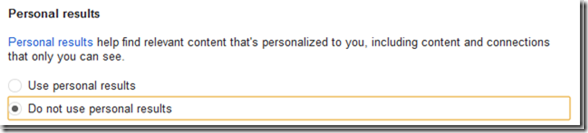
    2. Change the Personal results setting:
      5
    3. Hit the save button

    If that isn’t enough, switch to Bing.com (which I have found to be better lately anyway).

    Hope this was helpful.  smile

    One last thought: by setting the default behavior to not include the personal results you are in essence just having a new search facet available to you…
  • When in doubt, check ALL the permissions…

    Having just completed my last speaking engagement of 2012 it was time to get back into the swing of things and start playing with troubleshooting a bit. 

    The dilemma

    In a continuing effort to evolve my PowerShell build script for SharePoint I spent a few hours with my team playing with different settings.  One of my team members was driving to get better hands on experience with using PowerShell to configure SharePoint.

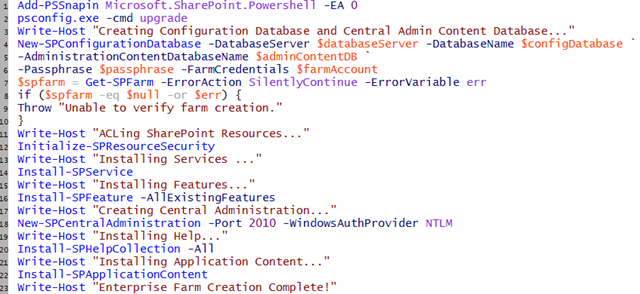
    We started with the very standard PSConfig script that I have used hundreds of times in the past:
    (I left out the variables to save some space)

    1

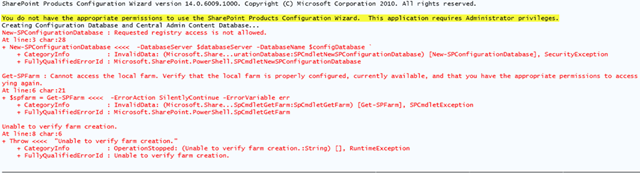
    The following error popped its ugly head up in PowerShell’s angriest color when attempting to run this initial farm configuration:

    New-SPConfigurationDatabase : Requested registry access is not allowed.

    The troubleshooting

    Check permissions

    Hackles went up immediately when the error was read out loud.  Prior to running the script we had just walked through several Security Best Practice checks, following Microsoft’s guidance in TechNet, partly to see if anything had changed recently (it hadn’t) and partly as a good refresher:

    Account permissions and security settings (SharePoint Server 2010)

    Plan administrative tasks in a least-privilege environment (SharePoint Foundation 2010)

    Plan for administrative and service accounts (SharePoint Foundation 2010)

    We went back and doubled checked all of our settings and found that things were configured as prescribed.  The SharePoint install account had local administrator permissions on the SharePoint server and SecurityAdmin and DBCreator rights on the SQL server.

    Examine the logs

    We visited our Server Event Log and 14 Hive Logs folder but found no evidence that anything was in error.  In fact, no logs entries were created at all…

    Check the firewall rules

    We validated that for this configuration, in a sandbox without external connections to the world, that the Windows Firewalls were turned off.

    Check the connection between servers

    Using the trusty Data Sources (ODBC) validation method we were able to make connection from the SharePoint server to the SQL server, and browse the available databases.

    Get thyself to Google!

    Completely perplexed at this point by an error that doesn’t make any sense due to the fact that the SharePoint install account was a local admin we went to our good friend Google and found, well to be honest a bunch of crap that didn’t help us in any way.  Lots of stuff for people who have lost access to Central Admin due to GPO changes, or had a driver go corrupt, or are trying to write to the registry using C# in ASP.net, & even a forum about people having problem registering their car in Nebraska.

    Review of Local Security Policies

    One last ditch effort to check the local security policy to see if a new GPO pushed down changes to turned out fruitless, however one of the AD admins mentioned they had seen an issue similar to this once before they changed the User Account Control Settings (UAC). 

    The Root Cause

    Not even thinking about it my response to the UAC question was “There is no need to do that, you just right-click and launch as Administrator or use my PowerShell script to run as a different user

    Upon examination of my team member’s screen it was revealed that: 2

    PowerShell ISE have in fact been opened without being run as Administrator.  A costly lesson from a time perspective, but a good learning experience for a newbie at PowerShell for SharePoint.

    The most troubling of all however was upon reexamination of the PowerShell error message we needed to only go 2 lines above the big red error message that we were troubleshooting on, to the plain black texted TRUE error: (highlighted here in yellow)

    3

    Unassuming and unnoticed as we troubleshot the obvious error, the line was thrown by the PSConfig.exe and not a bad PowerShell parameter which explains why PowerShell did not recognize it as an error.

    The moral of the story…

    Even after following every documented Best Practice out there, we still were able to find a way to cause an error.  While the UI was bad for the error that would have been useful to us, it was at least thrown in our faces.

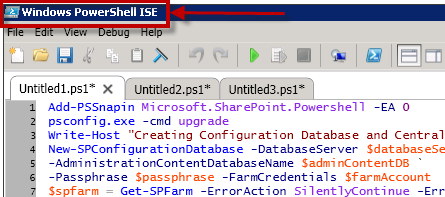
    The easy answer is to always make sure that you open PowerShell or PowerShell ISE as Administrator.  My personal preference is always going to be login in to servers using a non-SharePoint privileged account and then elevate permissions to run in the context of a SharePoint Farm admin or service account as demonstrated in my previous post which sets the run as Administrator for you.

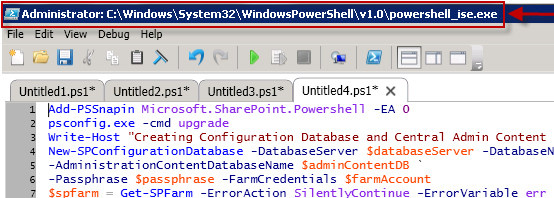
    Be sure when you are ready to do any SharePoint Admin work that you see the “Administrator:” in front of your PowerShell ISE path, like this:

    4

    At the end of a fun troubleshooting session we walked away with a new notch in our troubleshooter tool belt, a fun article to write, and team member who will never forget to fire the RunAs flag ever again.

  • Putting a bow on an amazing year of SharePoint

    Last week I had the honor of presenting “Heavy Metal PowerPivot Redux” to the San Antonio SharePoint Users Group.  My slide deck from that session can be found here: http://www.slideshare.net/SentriInc/sentris-saspug-deck-heavy-metal-power-pivot-redux

    The SASUGers were a great group of folks to present to and the location was tremendous.  We were hosted by Jeff Deverter at the RackSpace facility in Eastern San Antonio.  They purchased the Windsor Park Mall and have converted it into their offices.  It was completely wild experience touring a mall that I had shopped at previously and finding that it was now a state of the art office facility, complete with slide.

    Here are a few pictures from the evening:

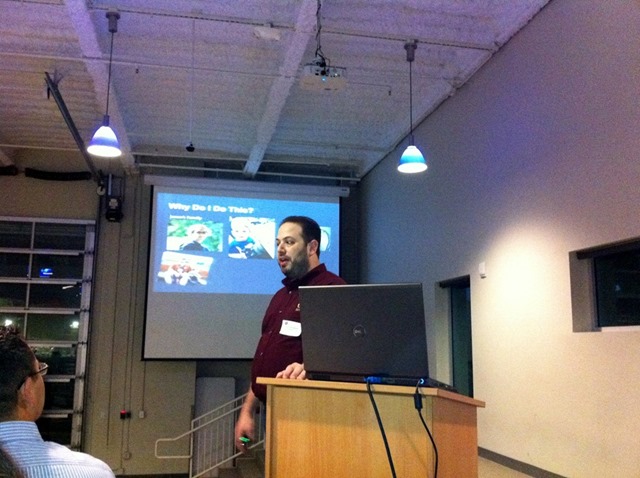
    From the presentation, & you have to love an SPUG that provides beer at the meeting!

    a b

    Touring the RackSpace Facility

    c d

    Time to ride the slide!

    e f

    Yes, I got stuck…

    g

    A post-slide group photo with the early birds

    h

    Needless to say it was a terrific evening and I can’t wait to come back and speak again at SASUG.  Thanks to Tom Resing, Jessica Saucedo, and Jeff Deverter for all they did to make it possible.

  • #SPSDenver Wrap-up

    banner

    I was honored to be a two-day speaker at SPSDenver this past weekend and had a marvelous time doing so.  The conference was well organized, properly planned, and extremely well attended.  Credit to Clayton Cobb and his team for putting on such a great event.  From the care of ensuring that they understood every issue that an attendee had to making sure that the fragile egos of the speakers were well cared for to making sure that every sponsor got the most out of the event, they really had their act together.  That was all before we even got to ShareSki!

    Every time I travel for SharePoint I meet new, interesting people and it reinforces my opinion that the SharePoint Community is the greatest group of people with a common technology interest anywhere.  It is always fun to get to know more people in our world and I am humbled to be a part of it.

    Needless to say, I was impressed by SPSDenver and am looking forward to returning next year if they are kind enough to have me back.

    For those who are looking for the SPSDenver slide decks please find them below:

    SharePoint Logging and Debugging

    SharePoint Performance Best Practices from the Field

  • SQL Server 2012 Release Candidate is here!

    SQL2012We are creeping slowly toward the release of SQL Server 2012 and all of its new, fun features for SharePoint 2010!  The first Release Candidate of SQL Server 2012, known as RC0, dropped today and is publicly available for download.  

    Here are a some links worth checking out:

    Download SQL 2012 RC0 – Get the software here!

    SQL Server 2012 Release Candidate is now Available! – SQL Server Reporting Services Team Blog

    Announcing Microsoft SQL Server 2012 Release Candidate 0 (RC0) – Analysis Services and PowerPivot Team Blog

    What’s New In Power View – SQL Server Reporting Services Team Blog

    The Pivot Transform – Now with UI! – SSIS Team Blog

    SSIS and PowerShell in SQL Server 2012 – SSIS Team Blog

    Microsoft SQL Server 2012 Training Kit Now available for Download

    Microsoft® SQL Server® 2012 Semantic Language Statistics RC0

    Microsoft® SQL Server® 2012 Release Candidate 0 (RC0) Manageability Tool Kit

    Microsoft® SQL Server® 2012 Express RC0

    Microsoft® SQL Server® 2012 RC0 Master Data Services Add-in For Microsoft® Excel®

    Microsoft® SQL Server® 2012 PowerPivot® for Microsoft® Excel® 2010 Release Candidate 0 (RC0)

    I am still digesting all of the changes that the teams were able to bring into RC0 and am excited to spend the weekend working with my team to examine what they all are going to mean for SharePoint 2010 integration with Microsoft BI.

    More to come as the weeks go on…

  • SharePoint Connections Las Vegas 2011 Wrap up

    I just completed my 5 sessions, 3 of which I presented with my great friend Cornelius J. van Dyk, here at SharePoint Connections Las Vegas.  While here we received several pieces of great news:

    1.) O’Reilly has green lit our book “SharePoint for Business Intelligence” which will be coming out in 2012 and will revolve around how you can solve business problems using SharePoint 2010, SQL Server 2012, & Visual Studio LightSwitch technologies for Business Intelligence.

    2.) We will be doing our “SharePoint Disaster Avoidance for Large Scale Enterprises” post conference  and several other sessions for the SharePoint Connections Las Vegas show in March 2012

    3.) Power was finally restored to my house in Nashua after more than 6 days!

    I had almost 450 attendees across my 5 sessions and I sincerely hope that you all enjoyed the conference as my as I did.  As promised, here are links to my final decks:

    SharePoint Logging & Debugging: The Troubleshooter’s Best Friend

    SharePoint Performance: Best Practices from the Field

    Battle Scarred But Still Standing: A SharePoint Administrator’s Tell All

    Heavy Metal PowerPivot Redux

    Human Workflow with Visio 2010 and SharePoint Designer 2010

    Heading home tonight and then back to the SharePoint Road Trip on Thursday to hit SharePoint Saturday Denver!

  • SharePoint Road Trips!

    With the devastating storm that has hit New Hampshire over the weekend, there is no better time for a SharePoint Road Trip to start than today!  It was so bad up here that our city postponed Halloween Trick-or-treating until next Sunday.  Here are a couple of pictures of the devastation, just from our driveway:

    1 2 3

    Here is a quick list of where you can find me over the next 2 months.

    banner

    I fly out to Las Vegas this evening to present 5 sessions at the SharePoint Connections Conference this week (October 31st – November 4th), 3 of which are with my good friend and collaborator Cornelius J. van Dyk.  I am presenting:

    HAD13: SharePoint Logging & Debugging: The Troubleshooter’s Best Friend (Tuesday)

    HAD14: SharePoint Performance: Best Practices from the Field (Tuesday)

    HAD15: Battle Scarred But Still Standing: A SharePoint Admin’s Tell-All (Wednesday)

    HAD12: Heavy Metal PowerPivot (Thursday)

    HNC04: Human Workflow with Visio 2010 and SharePoint Designer 2010 (Thursday)

    denver

    After Las Vegas I head to Colorado to take part in SharePoint Saturday Denver (November 11-13), an amazing 2 day event (registration is open and there are still some seats available), where I will be presenting:

    SharePoint Logging & Debugging: The Troubleshooter’s Best Friend (Friday)

    SharePoint Performance: Best Practices from the Field (Saturday)

    I am also planning on taking part in my first ShareSki as a part of SharePoint Saturday Denver!  I haven’t skied in Colorado in almost 10 years (East Coast skiing is nothing like Colorado sadly), but if you can’t find me on the slopes after my sessions, look for the guy in the full body cast by the fire drinking scotch  

     nhspug

    Corne & I will be presenting at the December installment of the Granite State SharePoint Users Group located at Daniel Webster College on 12/8 @ 6pm, which I happen to co-organize, followed by a SharePint.

    We will be doing our SharePoint Logging & Debugging: The Troubleshooter’s Best Friend session.  If you are in the area New Hampshire / Northern Massachusetts area please check us out.  We have had 7 sessions and we are continuing to grow.  We have great list of speakers already lined up for 2012!

    sasug

    I am heading back to the Lone Star State to round out the calendar year of SharePoint where I will be speaking at the SASPUG meeting on December 15th and presenting Heavy Metal PowerPivot Redux, a session featuring the goodness of PowerPivot v1 and a preview of PowerPivot v2 and Power View.  Join us at Rackspace – Castle I-35 and Walzem starting at 530p. 

    fireworks Happy New Years!

    That will wrap my SharePoint Road Trip to a close.  I hope to see you at one of more of these great events.  The 2012 calendar of SharePoint events is already starting to fill up with amazing events so keep an eye out for an announcement later in the year about those dates.

  • How to: Run PowerShell ISE as Administrator under alternate credentials

    Coming from a security focused AD background I prefer to have the Managed Service Accounts OU locked down with a GPO restricting interactive logon to a server. This helps avoid service accounts becoming compromised and being taken advantage of in attacks.

    Having an ISE is especially helpful when you are doing SharePoint work on the farm and while I am a big fan of PowerShell, running straight at the command line is often a pain. Rather than installing one of the terrific third party solutions out there for an Integrated Shell Environment I try to only install the PowerShell ISE.

    As we know, there are something that you cannot do unless you are running in the context of the Farm Administrator account. There is code out there that will let you elevate your PowerShell script and run in the context of a different user, but I really wanted to be able to open PowerShell ISE as the farm account so that I can run parts of a script at a time, or rerun specific lines.

    Here is the code that I compiled that allows me to launch PowerShell ISE as the Farm Admin account:

    Add-PSSnapin Microsoft.SharePoint.PowerShell -EA 0

    # Farm account name
    $farmAccountname =
    “domainservice_account”

    # Load the Farm Account Creds
    $cred = Get-Credential
    $farmAccountname

    # Create a new process with UAC elevation S
    tart-Process
    $PsHomepowershell.exe -Credential $cred -ArgumentList “-Command Start-Process $PSHOMEpowershell_ise.exe -Verb Runas -Wait

    Once your PowerShell ISE window is launched you can run the following code to validate that you are running as the user that you are expecting:

    [Security.Principal.WindowsIdentity]::GetCurrent().Name

    Great you learned some more neato PowerShell, but why do I need to use a PowerShell command for this?

    You may be asking why wouldn’t I just do a simple “SHIFT+Right Click” and “Run as different user” rather than resorting to a PowerShell solution. The answer is that doing that does not give you the runAs Administrator privileges that we need to do so many of SharePoint’s PowerShell Functions.

    Smarty Pants.

    powershell PowerShell launch code on GitHub

    notepad Text launch code

    powershell User Context validation code on GitHub

  • PowerShell Account Creation Script

    When building repeatable SharePoint farms I need to quickly create new service accounts. Since there is no need for a SharePoint Farm to be built using a Domain Admin account, there is really no need for a SharePoint Consultant to ask for or be granted Domain Admin rights.

    I spent a good portion of my career prior to SharePoint as a Domain Admin/AD Architect, and a good portion of that role is knowing that most people who ask for Domain Admin rights don’t actually need them.

    If you want to start off on the right foot with the AD team in any company, tell them you do not want or need Domain Admin rights. Immediately you have more credibility with them than most other people.

    As a result of this, I have put together an account creation script that I use and turn that over to the Domain Admins so that they can handle the creation for me. I simply list out the accounts that I want and then populate them into the following PowerShell:

    $domainName = $env:USERDOMAIN
    $LDAP
    = “LDAP://CN=Managed Service Accounts,DC=$domainName, DC=%local%
    $objCN = [ADSI]$LDAP
    $objUser
    = $objCN.Create(“user”,“CN=%Friendly Name%)
    $objUser.Put(“sAMAccountName”,“%SAMAccountName%)
    $objUser.Setinfo()
    $objUser.psbase.invokeset(“AccountDisabled”, “False”)
    $objUser.SetPassword(“pass@word1”)
    $objUser.setinfo()

    Using the $env:USERDOMAIN I am able to grab the current logged in domain context rather than having to specify it. Make sure that you change the last DC to the correct domain suffix (.com, .net, .org, etc). You will need to specify the %Friendly Name% & %SAMAccountName% that you are trying to create.

    The code above will allow you to create accounts that are active immediately without additional intervention.

    There are additional steps that need to be taken to grant rights for the User Profile Sync account and local Administrator rights that need to be granted to the Farm Admin account, but those will get covered in later posts.

    Sample scripts: powershell notepad

  • 1941 days later: Gilad Schalit is finally home

    gilad

    I normally keep my personal views on world happenings and politics out of this medium, but today is a very special day, so please feel free to disregard this post if you want but I feel that I must share my views on this topic.

    At the beginning of June 2006 I ended my time as a USY Advisor after more than 10 years of working with Jewish teenagers.  Much like my passion for technology, my passion for informal Jewish education was all consuming.  I am proud to say that I have watched many of my former USYers, affectionately known as my kids, go on to do amazing things: join the Marines, become doctors & lawyers, get married, have children of their own, start successful companies, start their own clothing lines, become teachers, and most amazing of all become informal Jewish educators themselves and dedicate some of their time to give back.  I was honored to allowed to participate in helping them learn and grow as young Jewish men and women and still keep in contact with many of them today.

    A few short weeks after Jill and I attended what was to be our last SWUSY Regional Convention as advisors we heard the news that Gilad Schalit had been captured.  At not even 20 years old it was impossible not to draw correlation between Gilad and some of my kids, especially since one of them who I consider to be family had just enlisted in the United States Marine Corp.

    It was heart wrenching and as the days and weeks went on news would periodically come out about Gilad, but the hopes were dwindling as the days went by.  Jill and I moved to Massachusetts and our synagogue had a picture of Gilad as a reminder.  Even without that, we have never forgotten.  We are a people of remembrances.

    In my lifetime I have seen some awe inspiring things: the Berlin Wall fell, the mapping of the human genome, the electing an African American President (whether you like/agree with/hate him or not, this was still a ground breaking thing for this country) ,Tiananmen Square, the invention of the personal computer, NASA, and the end of Apartheid but few things have touched me the way that the freeing of Gilad Schalit has. 

    The Marines have a mantra: Never leave a man behind.  Israel has freed 450 prisoners and will free a total of 1,027 prisoners at the end of 2 months, in exchange for 1 Israeli soldier. 

    In truth and honestly, I never expected to see the day when Gilad would be coming home.  I never believed that Hamas would allow him to see his home again. 

    It is my hope and prayer that the Israel/Palestinian conflict will come to a peaceful end.  My question & concern is what will that peace cost.  When reasonable people come to a negotiation table they generally are willing to compromise in some way.  To date, we have not seen that on both sides of the table with this conflict. 

    Bottom line here, after 1941 days it gives me goose bumps to finally be able to write the words “Welcome Home Gilad”.