Tag: SharePoint 2010

  • How to use PowerShell to get quota information in a usable way

    There are many good resources out there about how to create, modify, & set quotas using PowerShell, that isn’t an issue. Zach Rosenfield has a good post on Managing Bulk Site Collection Quotas in PowerShell and there are dozens of others out there who can give you all of the information about making changes to quotas that you want. My problem was how do I tell what a site’s quota template assignment is and how close they are to the limits using PowerShell rather than having to do a one by one click through the UI?

    The Painful Process

    You have a number of different quota templates and a reasonable number of site collections in your farm. In order to stay ahead of the curve you want to be able to monitor the growth of your site collections and know when they are heading toward their quota limits. In the UI you will go to Central Administration and visit the Application Management Section where you will find “Configure quotas and locks” as seen below:
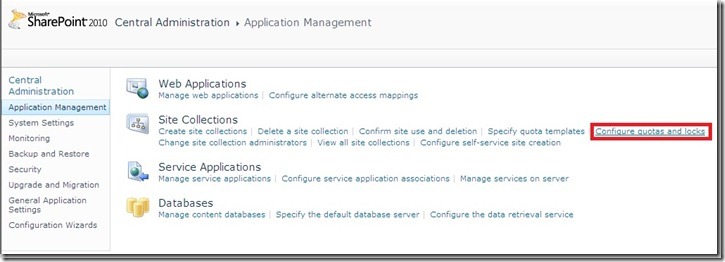
    a

    Next you will change the Site Collection selector to the site you want and that site’s information will be displayed like this:
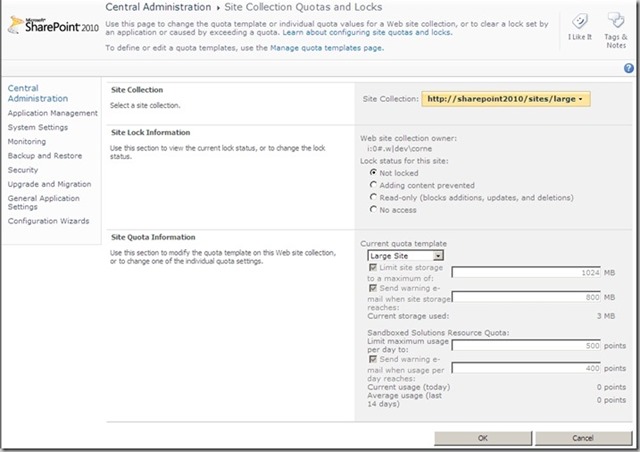
    b

    Valuable information & the ability to change the quota all in one place. Simple, easily, elegant. Only one problem: you have to do walk through this for EVERY site collection to get the information if you are simply trying to do an audit of the information.

    The PowerShell Solution

    I searched the blogosphere high and low looking for an answer to this problem. I pinged experts and friends who I expected would have had to solve this solution. The response I got in most cases was “there are pay products that have that functionality” or “I really hadn’t thought about that yet. Let me know when you find an answer”.

    Here is what I came up with: (download a copy as a text or PowerShell from GitHub)

    code

    The output of this script looks like this:

    Url : http://sharepoint2010
    Storage Used/1MB : 3
    Storage Available Warning/1MB : 0
    Storage Available Maximum/1MB : 0
    Sandboxed Resource Points Warning : 100
    Sandboxed Resource Points Maximum : 300
    Quota Name : No Template Applied

    Url : http://sharepoint2010/my/personal/spadmin
    Storage Used/1MB : 3
    Storage Available Warning/1MB : 80
    Storage Available Maximum/1MB : 100
    Sandboxed Resource Points Warning : 200
    Sandboxed Resource Points Maximum : 300
    Quota Name : Personal Site

    Url : http://sharepoint2010/sites/large
    Storage Used/1MB : 0
    Storage Available Warning/1MB : 800
    Storage Available Maximum/1MB : 1024
    Sandboxed Resource Points Warning : 400
    Sandboxed Resource Points Maximum : 500
    Quota Name : Large Site

    Url : http://sharepoint2010/sites/medium
    Storage Used/1MB : 0
    Storage Available Warning/1MB : 400
    Storage Available Maximum/1MB : 500
    Sandboxed Resource Points Warning : 200
    Sandboxed Resource Points Maximum : 300
    Quota Name : Medium Site

    This script loops through ALL of your web applications and retrieves information about ALL of your sites.

    You can specify a web application to run this against in line 3 just before the pipe. Additionally, if you want to use the script as is you will need to create the text file quotaoutput.txt in your C: root. You can change the name and location of that output file or just remove the “>> c:quotaoutput.txt“ all together and it will merely print to the screen.

    This is the information that I found useful. If you want to tweak the script to fit your needs please check out the MSDN articles about SPQuota Members and SPQuotaTemplate Members

    Caveat: If you have lots of sites, you might want to consider specifying a web application or a site collection. While I have a dispose statement in here, the script is loading the quotatemplate and spsite information into memory for every site in order to give you the information. This can be a long running operation and take up some significant resources on your server while it is happening. Know your environment and don’t allow this to cause you an issue. I send this information out to a file because I run this over night on my app server and can then look at the information later. The information can be shared with the team who handles support and customer relations so that we can work with the customer to either reduce the size of their site, or raise their quota as needed (usually comes with an additional cost).

    Does Storman.aspx solve this issue in SP1?

    As of this blog post I have not yet played with SP1 as I am methodically, to my detriment, walking through a complete new build of SharePoint 2010 SP1 on top of SQL 2008 R2 SP1 and Denali CTP3 side by side to do a comparative article (hint on future content). As a result I have been delayed in getting to validate and test this, so the honest answer is I am just not sure yet. Regardless, I know that there are going to be lots of people who will take months to upgrade to SP1 and hopefully this script will be able to help them in the mean time.

    Even if Storman.aspx does give a better UI interface, having the text file output of this information is going to be vitally important for better customer support in my opinion.

    Credit where credit is due

    Shannon Bray, the co-author of one of my current favorite tech books, Automating SharePoint 2010 with Windows PowerShell 2.0, pointed me to a lead in his book that started me on a path and numerous unnamed blog articles each lent a bit to the final answer which you see above. Additionally, two of my co-workers were instrumental in getting me over the last hurdles of this process, Jim Rearick & JJ Willette (supplied the nifty code to get the quota name). Thanks for all of your contributions.

    powershell PowerShell Get-QuotaInfo Script from GitHub

    notepad Text Get-QuotaInfo file

  • Review of the new storage “guidance” for SharePoint 2010 SP1

    Rob D’Oria, father of StoragePoint, has written a very comprehensive review of the new storage “guidance” from Microsoft with regard to the limits on ContentDB size when using RBSEBS.  It is a very long post, but completely worth reading from start to finish. 

    For a peak at what you can expect, here is a direct excerpt from one of my favorite sections:

    Everyone hold on, here’s the super-hard backup/restore process you have to follow in this brave new world:

    Backup

    1. Backup content database
    2. Backup BLOB store(s) referenced by content database

    Restore

    1. Restore BLOB store(s) referenced by content database
    2. Restore content database

    Did anyone pass out?  Anyone hyper-ventilating?  Anyone soil themselves?  I didn’t think so.  That’s the process in all of its complicated ugliness.  In this scenario the worst thing you end up with is some orphaned BLOBs…you have some extra BLOBs in the BLOB store back-up that are not reflected in the content DB backup because it was taken first.  Upon restoring these datasets the extra BLOBs are orphaned, but they will be garbage-collected if the EBS/RBS solution supports it.

    And, oh by the way, this is your worst case scenario.

    Please take some time and read Rob’s full post, which can be found here: http://blog.sharepointedutech.com/2011/07/11/sharepoint-contentdb-guidance-too-many-shades-of-gray-along-with-a-little-brown/

    Connect with Rob on Twitter at @robdoria or on LinkedIn at http://www.linkedin.com/in/robdoria

    Rob’s opinions in his post of ISVs are his own.  I may or may not agree with everything he says, so be sure to rub a couple of brain cells together and form your own opinions.

  • The big news: Data Storage Changes for SharePoint 2010

    I go on vacation for one week and they try to change the entire strategy on us, eh?  When I first started hearing rumbles about the changes announced by the Microsoft SharePoint Product Group via their blog it sounded like the world was completely changed and that all previously known storage strategies can be thrown out the window in favor of using RBS and storing whatever you want in the Content DB!

    Happily that is not at all what was being said.  While the recommended limits have been revised by Microsoft to suggest that significantly more can be stored, the key word in the statement is CAN, not should.

    Let’s examine a few telling things from the Product Group’s blog article:

    For a SharePoint content database up to 4 TB you need to additionally plan for the following two requirements:

    • Requires disk sub-system performance of 0.25 IOPS per GB, 2 IOPS per GB is recommended for optimal performance.

    • Requires the customer to have plans for high availability, disaster recovery, future capacity, and performance testing.

    • And you need to review additional considerations in the TechNet Boundaries and Limits article.

    What this part is suggesting to us is we can us a single mirrored set (RAID1) for a large content database and get what Microsoft is defining as “optimal performance” using a 15k RPM drive scenario (approximately 180 IOPS per drive).  Great if you are looking to get some separation and you are doing sequential I/O, however when you separate the BLOBs out of the ContentDB you aren’t doing sequential I/O anymore.

  • Office Web Apps Service Pack 1 is here!

    It has almost gone overlooked, but Office 2010 and SharePoint 2010 are not the only products to get a Service Pack 1 release today.  I know that the Office Web Apps are a bolt on to SharePoint 2010 and so they don’t get a whole lot of attention, but from an end user feature enhancement perspective, I am almost more excited about the Office Web Apps SP1 than anything else released today (Office 365 not withstanding).

    Sourced directly from Microsoft’s KB2460073:

    Overview of Office Web Apps SP1 improvements

    These are the key areas of improvement in SP1.

    All Office Web Apps

    • OpenDocument Format (ODF) support:
      Lets you view and edit ODF documents in Office Web Apps.
    • Lets you use Office Web Apps with the Google Chrome browser.
    • Outlook Web App document attachment viewing (for Exchange Online only):
      Lets you view Office document attachments in the browser directly from Outlook Web App.
    • Lets you use Office Web Apps with Internet Explorer 9 in Native mode.

    Word Web App

    Lets you print Word documents from Edit mode (in addition to View mode).

    Excel Web App

    • Added a Close button.
    • Lets you insert charts in Excel Web App.
    • Lets you copy and paste values and formulas by dragging the fill handle.

    PowerPoint Web App

    • Lets you print presentations from PowerPoint Web App.
    • Lets you edit text in more shapes, not just placeholder shapes.
    • Lets you insert clip art in PowerPoint Web App. (By default clip art support is disabled. An administrator can decide to enable it.)

     It is important to keep in mind that Microsoft has already released the June 2011 Cumulative Updates that contain security patches important enough to be released simultaneously with these Service Packs, so be sure to install that as well.

    Also, Microsoft has already released a list of known issues when installing Service Pack 1.  The Office Web Apps specific item,sourced directly from Microsoft’s KB2532126, is:

    • If Office Web Apps will be used in a mixed version environment, where Office Web Apps has SP1-or-later applied while SharePoint Server 2010 remains on the RTM version, you must install the following two updates before you install SP1 for Office Web Apps:
      • 2510639 Description of the SharePoint Server 2010 update: April 12, 2011

      • 2510648 Description of the Office Web Apps update: April 12, 2011

    Here are the download links:

    Service Pack 1 for Microsoft Office Web Apps 2010 (KB2460073)
    http://www.microsoft.com/download/en/details.aspx?id=26639

    Downloadable list of issues that the service pack fixes
    http://download.microsoft.com/download/B/0/D/B0D1540B-6CF6-4674-9C8E-7A45FD91C163/Microsoft%20SharePoint%202010%20and%20Office%20servers%20Service%20Pack%201%20Changes.xlsx

    SharePoint Foundation 2010 June 2011 CU (UPDATED)
    http://support.microsoft.com/hotfix/KBHotfix.aspx?kbln=en-us&kbnum=2536601

  • SharePoint 2010 Service Pack 1 is here!

    Today Microsoft released Service Pack 1 for SharePoint 2010 which is a rollup of all previous Cumulative Updates through April 2011, which means that deploying directly on top of RTM bits supported, as well as number of stability, performance, and security enhancements based upon customer feedback.  There is a detailed white paper that about the Service Pack that can be found at this location.​ ​

    CAVEAT: Microsoft strongly recommends installing the June 2011 Cumulative Update immediately after the installation of Service Pack 1. The June Cumulative Update includes several important security and bug fixes that are not included SP1.

    Here is the list of of the new features in SP1:

    · Support for SQL Server Code Name “Denali”

    anyone who has read any of my tweets or articles has probably noticed that I am a fan of Denali, so this is a huge feature for me

    · Shallow copy functionality

    this new feature allows sites with externalized blobs to be moved from one contentdb to another without having to reinternalize the blobs using the Move-SPSite powershell cmdlet. 

    The white paper states​:

    Prerequisite
    In order to use shallow copy, you must have installed the Microsoft® SQL Server® 2008 R2 Remote Blob Store. The Remote Blob Store is included in the Microsoft® SQL Server® 2008 R2 SP1 Community Technology Preview Feature Pack (http://go.microsoft.com/fwlink/LinkId=221775).

    There are a couple of things that jump out at me here that are concerning:

    1. The link doesn’t work
    2. SP1 supports functionality that is only available in SP1 CTP?  RBS is supported in SQL 2008 R2, does it work with that? (I fully intend to test this and post back, but it is a concern that I felt was worthy of raising)

    I’m not getting all nervous about this just yet since this all just released today.  It will be interesting to see what comes of this over the next couple of days/weeks, but it is a VERY exciting feature if it works as advertised.

    · Site recycle bin

    Great feature to allow self recovery of Site Collections and Sites without having to revert to backups or third party tools.

    · Improvements to storage management (StorMan.aspx)

    Storage Space Allocation is huge when dealing with quota enforced sites.  This page, which was available in versions prior to 2010, allows end users to view their large files and determine what fat to trim to keep within their quotas.

    · Cascading filters for Performance Point services

    Quoted from the white paper: “New cascading filter support enables you to pass the value of one filter to another.”

    · Additional browser support

    Better support for Chrome

    One more piece of really useful information to come out of the white paper:

    Updated Windows PowerShell Commandlets

    · NEW: Get-SPDeletedSite (SharePoint Server 2010)

    · NEW: Remove-SPDeletedSite (SharePoint Server 2010)

    · NEW: Restore-SPDeletedSite (SharePoint Server 2010)

    · Move-SPSite (RBSProviderMapping parameter added) (SharePoint Server 2010)

    Here are the download links:

    Service Pack 1 for SharePoint Foundation 2010 (KB2460058)
    http://www.microsoft.com/download/en/details.aspx?id=26640

    Service Pack 1 for Microsoft SharePoint Server 2010 (KB2460045)
    http://www.microsoft.com/download/en/details.aspx?id=26623

    Downloadable list of issues that the service pack fixes
    http://download.microsoft.com/download/B/0/D/B0D1540B-6CF6-4674-9C8E-7A45FD91C163/Microsoft%20SharePoint%202010%20and%20Office%20servers%20Service%20Pack%201%20Changes.xlsx

    SharePoint Foundation 2010 June 2011 CU (UPDATED)
    http://support.microsoft.com/hotfix/KBHotfix.aspx?kbln=en-us&kbnum=2536601

    SharePoint Server 2010 June 2011 CU (UPDATED)
    http://support.microsoft.com/hotfix/KBHotfix.aspx?kbln=en-us&kbnum=2536599

  • Speaking at SharePoint Connections Coast to Coast 2011 in San Antonio

    SATX

    My friend, Cornelius J. van Dyk, and I will be presenting at this year’s SharePoint Connections Coast to Coast conference in San Antonio held May 23-25 at the Hyatt Regency Hill County Resort & Spa.

    We will be teaching the ITPro Pre-Conference “SharePoint Collaboration Bootcamp” plus presenting three sessions, “Heavy Metal PowerPivot”, “Time Is Money. How SharePoint Logging will Save You Both!”, and “Wish I’d Have Known That Sooner! SharePoint Insanity Demystified”. All 3 of these sessions promise to be fresh and exciting so come out and see us if you’re anywhere in the San Antonio area during that time.

    We hope to see you there!

    jase 

  • SPFLogger–A whole new way to look at SharePoint 2010 Logs

    One of the most amazing, and little talked about, features of SharePoint 2010 is its new logging database and the power that comes along with it.  About 4 months ago I noticed a gap in the market and started talking to 2 friends of mine, David Feldman and Cornelius J. van Dyk, making the statement “I think that this would make for a really neat winforms app.”  After some brain storming we decided to take the idea a different direction and use Silverlight 4 RIA Services.

    The tool in its initial beta offering is fairly simple, yet elegant.  It gives the user a very concise view of their NTEvent Logs, ULS Logs, and Timer Job Logs.  Rather than having to write T-SQL against the Logging Database’s views, we provide an easy to use Silverlight interface to quickly and easily view the log entries, complete with filtering and some basic analytics for NTEvent Logs and Timer Job Logs.

    This was my first foray into development and coding, as almost all of my career in technology has been spent on the ServerOperationsArchitecture site of the world, and this was an eye opening and career life changing experience.  I got to work with 2 of my very good friends on a project that I am very passionate about, and I have been overly supported by my amazing, wonderful, beautiful, and ever patience wife, Jill, and my 2 amazing boys, Max & Sam, as I have dedicated my every waking free moment to this project.

    Tonight, after 4 long months, I clicked the button to release SPFLogger to the CodePlex community.  Please go check it out and give us feedback so that we can continue to grow and evolve this into something great.  It is currently licensed under a dual license which allows for personal use under GPL version 2.0 and a custom license for commercial and closed source applications.  Basically we wanted to keep people from using our code to make money without giving some to us, but we want people to be able to use it!

    The link is http://spflogger.codeplex.com.  We really hope that you love this tool as much as we do.

    spflogger

  • Speaking at SharePoint Connections Coast to Coast 2011 in Boston

    image

    My friend, Cornelius J. van Dyk, and I will be presenting at this year’s SharePoint Connections Coast to Coast conference in Boston held April 25-27 at the Marriott Long Wharf.

    We will be presenting two sessions, “Heavy Metal PowerPivot” and “SharePoint Logging – The Undiscovered Country”. Both sessions promise to be fresh and exciting so come out and see us if you’re anywhere in the Boston area during that time.

    We hope to see you there!

     imageimage

  • Developer Dashboard activation and parameters… up to the elbow…

    Activating through PowerShell

    In doing some research I have had some difficultly finding a single good resource for how to turn on the Developer Dashboard using PowerShell and what the parameters are for doing so.  Here is what several hours or pouring through numerous resources has turned up, and I am sure it is not 100% complete:

    Code to turn on the Developer Dashboard

    image

    This will turn on the icon at the top right hand corner of your masterpage for anyone with Designer or higher rights. 

    devdashboard_icon

    Optional Parameters

    Who can see it?

    image

    Some Mask Settings

    EmptyMask = allows everyone to see the developer dashboard
    FullMask = requires full control policy or site owner permissions to see the developer dashboard
    AddAndCustomizePages = default mask setting

    There are many more options for Mask Settings which can be found by reviewing the SPBasePermissions list on MSDN.

    Options:

    1.) Allow everyone to see the Developer Dashboard
        a.) set EmptyMask and remove icon from Masterpage
        b.) append ‘?Developer Dashboard=true‘ to the end of any page you want to see the developer dashboard on
    2.) Allow only people with Full Control (policy holders or site owners) to see the Developer Dashboard
        a.) set FullMask
        b.) give the supporting team a full control policy or grant one-off permissions
    3.) Leave this setting alone and anyone with Designer or higher rights will see the icon

    Is there any more data I can get than this?

    image
     

    TraceEnabled gives the additional section at the bottom of the developer dashboard which gives you:
        1.) Request Details
        2.) Trace Information
        3.) Control Tree
        4.) Session State
        5.) Application State
        6.) Request Cookies Collection
        7.) Response Cookies Collection
        8.) Headers Collection
        9.) Response Headers Collection
        10.) Form Collection
        11.) Query String Variables
        12.) Server Variables

    There is a TON of data here that you might not see otherwise, and you only see it if you expand the section at the bottom called:

    trace info

    If you aren’t interested in seeing any of this data or allowing your users to see any of this data, just do not execute this option as the default is set to false.

    If you are still stuck in 2007 mindset

    Here is the corresponding STSADM Command:

    image

    A Quick Note from the Author

    All of the above examples have used OnDemand as I believe that is best option, however you can replace OnDemand with Off or On as you see fit, this is just how I am writing it.

    Grab a copy of the PowerShell code referenced about from my SkyDrive here.