Category: SharePoint Longhorn

  • Set-SPManagedAccount syntax for password resets

    Working with the PowerShell command for Set-SPManagedAccount this morning I found that the TechNet bulletin for this command has an inaccuracy with regard to password changes. 

    When trying to reset a password from PowerShell I followed the syntax and used:

    Set-SPManagedAccount –Identity domainaccount AutoGeneratePassword true

    I got the following error:

    Set-SPManagedAccount : A positional parameter cannot be found that accepts argument ‘true’.
    At line:1 char:21
    + Set-SPManagedAccount <<<<  -Identity domainaccount -AutoGeneratePassword true
        + CategoryInfo          : InvalidArgument: (:) [Set-SPManagedAccount], ParameterBindingException
        + FullyQualifiedErrorId : PositionalParameterNotFound,Microsoft.SharePoint.PowerShell.SPCmdletSetManagedAccount

    Turns out that the command has been changed and there is now no need for the “true” flag as the default is now “true” but you get the opportunity to choose (unless you pass the -confirm:$false flag)

    The result of passing the command without the “true” looks like this:

    Confirm
    Are you sure you want to perform this action?
    Performing operation “Set-SPManagedAccount” on Target “USsvc-ssaspfarm”.

    [Y] Yes  [A] Yes to All  [N] No  [L] No to All  [S] Suspend  [?] Help
    (default is “Y”):


    If you select “Y” the system will change the password for you with an automatically generated password.  If you want to validate the change an easy way to do it is to follow my previous blog post, https://bifocal.llc/how-to-get-your-managed-account-passwords-when-they-are-changed-automatically-by-sharepoint-2010/, to view the passwords before and after you run the command.
  • How to: Get your Managed Account passwords when they are changed automatically by SharePoint 2010

    Scenario:

    Using Managed Accounts the way that SharePoint 2010 is designed you allow SharePoint 2010 to manage your password changes automatically for you. Your farm gets into an inconsistent state, or you allow SharePoint 2010 to change your farm admin account and you realize that you cannot start the UPS without knowing the farm account password. What do you do?

    Resolution:

    Run the following PowerShell command from the SharePoint 2010 Management Shell as a Farm Administrator:

    function Bindings()
    
    {
    
    return [System.Reflection.BindingFlags]::CreateInstance -bor
    
    [System.Reflection.BindingFlags]::GetField -bor
    
    [System.Reflection.BindingFlags]::Instance -bor
    
    [System.Reflection.BindingFlags]::NonPublic
    
    }
    
    function GetFieldValue([object]$o, [string]$fieldName)
    
    {
    
    $bindings = Bindings
    
    return $o.GetType().GetField($fieldName, $bindings).GetValue($o);
    
    }
    
    function ConvertTo-UnsecureString([System.Security.SecureString]$string)
    
    {
    
    $intptr = [System.IntPtr]::Zero
    
    $unmanagedString = [System.Runtime.InteropServices.Marshal]::SecureStringToGlobalAllocUnicode($string)
    
    $unsecureString = [System.Runtime.InteropServices.Marshal]::PtrToStringUni($unmanagedString)
    
    [System.Runtime.InteropServices.Marshal]::ZeroFreeGlobalAllocUnicode($unmanagedString)
    
    return $unsecureString
    
    }


    Get-SPManagedAccount | select UserName, @{Name="Password"; Expression={ConvertTo-UnsecureString (GetFieldValue $_ "m_Password").SecureStringValue}}
    
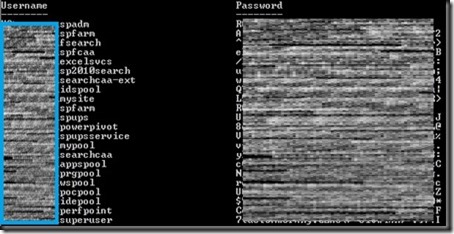
    The output will look similar to:
    screenshot1
    Special Thanks:
    Huge thanks to Microsoft for unveiling this nugget to us during a recent call to SharePoint CritSit support. Derek Martin, of Slalom Consulting, and my jaws collectively hit the floor when they showed us this one and we knew we couldn’t keep it to ourselves.
    Update: Thanks to Todd Klindt for pointing out that the Live Writer Add-in that I have been using makes the code easily readable, but horrible to copy. Download the .ps1 file from here or the text file version from here rather than trying to copy from above and save yourself some time.
    powershell notepad
  • Throwing my horns in to the ring…

    I have finally broken down and joined the blogosphere.  I never thought the day would come, but here we are.

    What would make me change my stance on this?  There are a few reasons, but the main driver is that I am consistently reading other people’s blogs looking for hints, tips and tricks on dealing with some of the weird and wacky problems that SharePoint throws are us and now that I am moving from working in a completely customized environment to a more OOB world my experiences might start to become relevant to someone else.

    On a daily basis I work with some of the brightest minds that the SharePoint community has to offer and while some of our findings have gotten posted through their blogs, I figured I ought to make a real contribution to the community myself.

    What can you expect from this blog?

    Through this blog I hope to aid people who are running into similar issues that I see on a daily basis and allow them to contribute back with their experiences.  You may find some co-authoring here as many of my cohorts are blogging themselves.  We tend to collaborate extensively, so we will likely cross post in an attempt to get our experiences out to a wider audience.

    A little about the author

    I have been working with Microsoft Server technologies since around 1998 when I was supporting Motorola in Austin, TX.  I went to work for the University of Texas for 5 years where I developed expertise in Active Directory and Exchange.  I left UT to go on the road doing work for Dell in a partnership with Microsoft.  I spent 2 years traveling doing architecture, design and implementation of Active Directory and Exchange Migrations.  I joined my current employer in 2007 and have been doing SharePoint ever since.  My work has kept me out on the bleeding edge of the SharePoint world and Microsoft has continuously come back and asked us how the hell we solved some of the issues that we have run into.  Our SharePoint 2007 environment was run under FBA in a way that none of our findings would likely benefit the community, however now that SharePoint 2010 is running with Claims, it is a whole new world.

    Outside of my crazy working world I am a happily married father of 2 boys and a die-hard Texas Longhorns fan and San Antonio Spurs fan.