Category: SharePoint 2013

  • SharePoint 2013 Unveiled!

    It is a very exciting day to be in the SharePoint space!  We have been speculating and anxiously awaiting this day for a long time, and of course it happens when I am out on vacation! smile

    I got the news the the veil was lifted while at lunch and have been anxious to get back to my keyboard ever since.  There are so many great new features in this release that I am going to hold back from trying to put everything into a single post, so here are the high points for me based on what I have parsed in the public offering:

    1.) Architectural changes in SharePoint 2013

    a.) Claims first.  The default for SharePoint 2013 web applications will be in Claims-based Authentication.  Classic mode will still be supported, but Classic mode authentication web apps will have to be created through PowerShell.  Does this mean that Microsoft will finally support 100% of the features in SharePoint 2013 under Claims?  I am betting on it.

    b.) Office Web Apps moves out from under the SharePoint umbrella and takes on a life of its own, giving the ability to share Office docs on the web in more than just SharePoint.  Moving to its own architecture, that cannot be hosted on the same servers as SharePoint, gives it scalability and credibility that Microsoft is investing in this model.

    c.) Search becomes unified.  There is no longer multiple versions of Search for SharePoint.  Many exciting things to uncover in this space, especially when leveraged with Office Web Apps, however the topology requirements grow considerably.

    d.) The new Distributed Cache Service. Scale points have not yet been determined, but expect more data points on this during the Beta release.

    e.) Server requirements changes. The big surprise here is that there are no changes to the minimum hardware requirements for the servers.  The only real change here is in that Windows 2008 R2 SP1 is the minimum software platform and SQL 2008 R2 SP1 is the minimum database platform.  64bit is required across the board.

    f.) Web Analytics changes.  They have gutted the model used for SharePoint 2010 and have made massive improvements, including considerations for scaling and impact on SQL & IO.

    g.) Work Management Service.  This is one of the biggest features for end users in this version of SharePoint.  WMS provides us with out of the box task aggregation from SharePoint, Exchange, and Project Server with additional systems that could be added later.  Due to the nature of the model, I expect that this will be extended by third parties to hopefully include many other systems driving SharePoint to be the one place to go to manage your day.

    h.) Upgrade gets a facelift.  Visual Upgrade is completely changed for SharePoint 2013 and there are some architectural considerations to be taken into account here.  More to discuss here than what I can put into a partial blog post, but come find me at SPTechCon on Sunday night at the “Meetup with SharePoint Experts” where I will be sitting with Shane Young & Todd Klindt of Rackspace at the Upgrade table and I am sure that we can discuss for hours.

    2.) Social changes

    a.) Massive investment in Social, even before the acquisition of Yammer, have been made in SharePoint 2013 around Microfeeds, Social Lists, Personal sites, a new way of handling personal documents.

    b.) A complete re-architecture around privacy settings &sharing to make the process more intuitive for the user.  Users of SkyDrive are going to find the screens very familiar.

    3.) The new App Model & WCM

    a.) While generally not topics that I write about, I read about them constantly and would recommend that you join me in reading every word that Andrew Connell has to write about these topics.  Not only is AC one of the brightest SharePoint minds I know (Scot Hillier not withstanding), he is also one of the instructors who developed and delivered the Ignite training and the MSDN training that is now available.  Follow AC on twitter at @andrewconnell and on his blog at http://www.andrewconnell.com/blog/. 

    If you try following him at @SharePointAC you will find Andrew Clark instead, who is a great guy and an awesome guy to take to a bar if you like pre-prohibition cocktails and fun SharePoint dev talk, but ultimately not the same person.

    Now is the time to get your hands on the beta bits and start learning!  Here are a few resources I have found so far from my scouring and a few other posts:

    Builds:

    Microsoft SharePoint Server 2013 Preview

    SharePoint Foundation 2013 Preview

    SharePoint Designer 2013

    Microsoft Office Web Apps Server Preview

    Microsoft Office 2013 Audit and Control Management Server

    SQL 2012 SERVICE PACK 1 (SP1), COMMUNITY TECHNOLOGY PREVIEW 3 (CTP3)

    Reading:

    TechNet: SharePoint 2013 Preview

    Downloadable eBook: Deployment guide for SharePoint 2013 Preview

    SharePoint 2013 for IT pros

    SharePoint 2013 training for IT pros

    Topologies for SharePoint 2013 Preview

    Back up and restore: SharePoint Server 2013 Preview

    Search architectures for SharePoint Server 2013 Preview

    Enterprise search architectures for SharePoint Server 2013 Preview

    SharePoint 2013 Preview: App Overview for IT Pro

    What’s new in business intelligence in SharePoint Server 2013 Preview

    SharePoint 2013: Claims is the new black – by Wictor Wilén

    SharePoint 2013 IT Pro and Developer training materials released – by Vesa Juvonen

    Understanding SharePoint 2013 Apps (aka: Apps 101) – by Andrew Connell

    SP2013 WCM: Forget Everything You Knew About SharePoint WCM! – by Andrew Connell

    You are likely to notice an uptick in blogging from many people who have gone quiet over the past few months (myself included) while we have been working on things we haven’t been able to talk about.  Now that the flood gates are open expect to hear from me more often.

  • PowerPivot & Claims Based Authentication–Is there hope in SQL 2012?

    I promised an update on this in my previous article and it is time to share what I have learned.

    The issue:

    As many of us have painfully found, PowerPivot v1 on a Claims Based Authentication web application is not supported in SharePoint 2010.  I had a case open with Microsoft last year that had the aspirations of rectifying that situation.  We had hoped that working with the PowerPivot team (a part of the SQL Server Product team) and the SharePoint Product team that we would be able to find a way for Microsoft to change their stance and provide us a way to allow PowerPivot v1 to be supported. 

    The answer for v1:

    Sadly, the changes that would have to be made were too drastic for Microsoft to make in the middle of PowerPivot v1’s existing product lifecycle. 

    The new and improved question:

    That begs the question: Is there hope that PowerPivot v2 will be able to work on a Claims Based Authentication web application?

    The caveated answer:

    Keeping in mind that the product has not launched yet and things can still change (they won’t, but lets keep hoping) and that all of the SQL 2012 TechNet that are posted currently have the following statement at the top of them:

    [This documentation is for preview only, and is subject to change in later releases. Blank topics are included as placeholders.]

    The answer is still no.  In the TechNet article entitled “Hardware and Software Requirements (PowerPivot for SharePoint and Reporting Services in SharePoint Mode)” you will find the section under PowerPivot Sofware Requirements says in reference to SharePoint web applications:

    “PowerPivot for SharePoint only supports SharePoint web applications that are configured for classic-mode authentication. If you are adding PowerPivot for SharePoint to an existing farm, be sure that the web application you plan to use it with is configured for classic-mode authentication. For instructions on how to check authentication mode, see the section “Verify the Web application uses Classic mode authentication” in Deploy PowerPivot Solutions to SharePoint.“

    Well damn.  Is there any hope that this is ever going to change?

    Keep your chins up.  Rumor in the interwebs is that there is going to be a new version of SharePoint coming in sometime soon.  I can tell you that Microsoft has heard and continues to hear our cries out about this matter.  The more we raise this up as an issue, the more real it will be to Microsoft and the more likely they will be to invest in making the change.  If there is no perception that this is an issue, then there is no attention that will be paid and no investment dollars that will be spent.

    If this is an issue for you, make sure that your Microsoft reps hear about it.  I talk about this with every Product Team member that I can get to listen to me for 5 minutes and I have never met with anything other than a warm reception and a sincere desire to know the feedback on how to make the product better.

    Is this going to stop you from deploying PowerPivot v2 and Power View?

    Not a snowman’s chance in the hot Jamaica sun.  I cannot wait for the final bits to drop so that I can get this amazing new product suite into the hands of every customer who wants to do BI.  The new BI story is too game changing not to get on the bus, and if I am riding it why not be driving smile

  • How to: Get your Managed Account passwords when they are changed automatically by SharePoint 2010

    Scenario:

    Using Managed Accounts the way that SharePoint 2010 is designed you allow SharePoint 2010 to manage your password changes automatically for you. Your farm gets into an inconsistent state, or you allow SharePoint 2010 to change your farm admin account and you realize that you cannot start the UPS without knowing the farm account password. What do you do?

    Resolution:

    Run the following PowerShell command from the SharePoint 2010 Management Shell as a Farm Administrator:

    function Bindings()
    
    {
    
    return [System.Reflection.BindingFlags]::CreateInstance -bor
    
    [System.Reflection.BindingFlags]::GetField -bor
    
    [System.Reflection.BindingFlags]::Instance -bor
    
    [System.Reflection.BindingFlags]::NonPublic
    
    }
    
    function GetFieldValue([object]$o, [string]$fieldName)
    
    {
    
    $bindings = Bindings
    
    return $o.GetType().GetField($fieldName, $bindings).GetValue($o);
    
    }
    
    function ConvertTo-UnsecureString([System.Security.SecureString]$string)
    
    {
    
    $intptr = [System.IntPtr]::Zero
    
    $unmanagedString = [System.Runtime.InteropServices.Marshal]::SecureStringToGlobalAllocUnicode($string)
    
    $unsecureString = [System.Runtime.InteropServices.Marshal]::PtrToStringUni($unmanagedString)
    
    [System.Runtime.InteropServices.Marshal]::ZeroFreeGlobalAllocUnicode($unmanagedString)
    
    return $unsecureString
    
    }


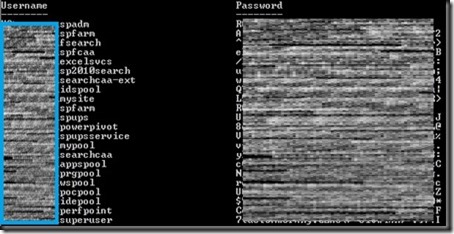
    Get-SPManagedAccount | select UserName, @{Name="Password"; Expression={ConvertTo-UnsecureString (GetFieldValue $_ "m_Password").SecureStringValue}}
    
    The output will look similar to:
    screenshot1
    Special Thanks:
    Huge thanks to Microsoft for unveiling this nugget to us during a recent call to SharePoint CritSit support. Derek Martin, of Slalom Consulting, and my jaws collectively hit the floor when they showed us this one and we knew we couldn’t keep it to ourselves.
    Update: Thanks to Todd Klindt for pointing out that the Live Writer Add-in that I have been using makes the code easily readable, but horrible to copy. Download the .ps1 file from here or the text file version from here rather than trying to copy from above and save yourself some time.
    powershell notepad