Category: SharePoint 2010

  • The definitive BCS in SharePoint 2010 book now available

    My friend and colleague Scot Hillier has just published his new book with his co-author, Brad Stevenson, called “Professional Business Connectivity Services in SharePoint 2010”. 

    Scot brought me a copy today and from the brief bits that I have had an opportunity to read so far (plus what I was privilege to review prior to the printing), it far exceeds the expectations one might have for simply being THE BOOK (yes I know there is only one out there) on BCS.  Scot targets the book to C# developers, but even a simple admin/architect type like me is able to understand and follow Scot’s easy to read style of writing and grasp the concepts.

    As the “stereotypical SharePoint admin” model punching bag for Scot’s presentations I may be a bit biased as I get to work with this talented guy on a regular basis, but I highly recommend you invest in this book, available in paperback or e-book, and give it a thorough read.  Chapter 8 on “Working with BCS Security” and the details he gives around Secure Store and Claims Authentication make it worth the investment alone for us admin types.

    Shameless Plug (as though this whole post wasn’t already!)
    Buy Scot’s book from the publisher or from Amazon.com and support his good work.

  • How to: Fix the "Unable to access SharePoint sites from the localhost" problem

    Ever try to access a page on your SharePoint site from your web front end only to get prompted for a login that never lets you through?

    The issue happens when dealing with sites that Integrated Authentication and have names that are mapped to the loopback address.  Translation:  if you are using Windows with Claims or Classic Mode web applications  and you are trying to connect from the server, this is you.

    The LoopbackCheck security feature is enabled by default on Windows Server since 2003 SP1 and since most SharePoint Farms are going to have an FQDN AAM or two, this is going to be something that many admins are going to run into.

    There are two options, and as in most scenarios one is easy and the other is the right way.

    Option 1. – create a Multi-String Value that has all of your AAMs for the server and restart the IISADMIN service.

    Option 2. – disable the LoopbackCheck on the server

    The Microsoft recommended option is #1 (I happen to agree), however you have to do this on every server (however if you have access to create and modify GPOs, this should be something that you can just have centrally managed for all SharePoint WFEs) and you need to have the list of all of your AAMs handy with which to do it.  Not a ton of work, so bite the bullet and update the registry entry.

    Serious caveat:  Option 2 is great if you are working on a developer vm or something to play with for a short burst, but if you are going to put something in production, please protect yourself and allow Microsoft to do the same.  This is one of those security scenarios where they are putting a validation check in place to protect you from malicious attacks.

    For the more detailed steps on making the changes visit the KB article and get it from the horse’s mouth.

  • Update: PowerPivot in Windows with Claims Authentication on SharePoint 2010 case

    We had a second great discussion with Lee Graber and Venky Veeraraghavan and our MS Account Team today.  They are actively working on getting a solution to allow PowerPivot to work with Windows Claims Authentication in SharePoint 2010, as I talked about in my previous post.  They are expecting to down select an approach, from 4 down to 1, by the end of the week and give us an update on what the timeline will look like.This has been a great experience working with the two product teams, SharePoint and PowerPivot.  Everyone at Microsoft is very dedicated to getting a solution that will not only work for this one customer (us), but for the general population as well.I will update again once I have more to report!

  • All PowerPivot Features supported only in Classic Mode Authentication

    Surprised?  I was this week as well.  I have had a case open with Microsoft since October that we have been playing with back and forth trying to figure out why automated refreshing of a PowerPivot workbook wasn’t working.We let the case go off and on for a quite a while because in the opening days we found that if we ran the PowerPivot Service Application Pool in the context of the farm admin account, that manually refreshing the data would work.  Having a work around in hand threw this issue to the back of the queue for a while.

    After much diagnosis, discussion, and many weeks of thinking that the Secure Store Service wasn’t working properly, along came a very simple explanation: PowerPivot requires Classic Mode Authentication.  FBA and Claims are not supported for doing data refresh or usage data collection scenarios.

    The answer to our question came via 3 references:

    PowerPivot Data Refresh – Everything you always wanted to know  – Page 14 is a good place to start.  Section called “Anatomy of PowerPivot Data Refresh” – written by Mariano Teixeira Neto

    Plan PowerPivot Authentication and Authorization – “To support data refresh and usage data collection scenarios, PowerPivot for SharePoint requires Classic mode authentication. PowerPivot requires a Windows domain user to be the identity behind the SharePoint security token, which it will use to create a history of user activity and document ownership, and to connect to external data sources during data refresh.” – quoted from Technet

    Why PowerPivot requires ‘classic-mode’ web applications – “The second one (i.e. ‘b’ above) is a bit trickier and it is the core issue for this blog entry. In PowerPivot, when connecting through our front-end web services (aka, the PowerPivot Web Service, or PWS in our architectural design) the underlying protocol is the same as the one that earlier versions of Analysis Services used for the ‘data pump’ feature (http://technet.microsoft.com/en-us/library/cc917711.aspx). That protocol does not know about claims – it relies on getting a Windows identity.” – quoted from Dave Wickert, aka PowerPivotGeek

    One of the answers that we got regarding this is that PowerPivot is a part of SQL Server 2008 R2 and not a part of SharePoint 2010, so it wasn’t really a SharePoint authentication problem.  ((Does that sound right?))

    We have gone back to Microsoft and are looking to see if this is something they are going to be able to fix so that Claims Based Authentication can truly be the end-all-be-all solution that we are all hoping that it can be, or if this is just one of many things that we are going to run into that aren’t yet supported in CBA mode.  For those keeping count we are now up to 2 major issues that have come back to CBA as the root cause, the other being the Site Directory issue (which we are still waiting to hear if they are going to accept our hotfix request or not… last update from the engineer was yesterday).

    I have to give a ton of thanks to the MS TAM (Mike Mitchell) that I work with, the engineer (Jason Haak) who worked on this case with us, and the 2 guys who seem to be the experts in the world on PowerPivot, Dave Wickert and Lee Graber.  We spent so much time focused on the technology of the platform and how cool PowerPivot was to work with, that we forgot rule #1 (which they kindly reminded us of)… RTFM.


  • How to: Get your Managed Account passwords when they are changed automatically by SharePoint 2010

    Scenario:

    Using Managed Accounts the way that SharePoint 2010 is designed you allow SharePoint 2010 to manage your password changes automatically for you. Your farm gets into an inconsistent state, or you allow SharePoint 2010 to change your farm admin account and you realize that you cannot start the UPS without knowing the farm account password. What do you do?

    Resolution:

    Run the following PowerShell command from the SharePoint 2010 Management Shell as a Farm Administrator:

    function Bindings()
    
    {
    
    return [System.Reflection.BindingFlags]::CreateInstance -bor
    
    [System.Reflection.BindingFlags]::GetField -bor
    
    [System.Reflection.BindingFlags]::Instance -bor
    
    [System.Reflection.BindingFlags]::NonPublic
    
    }
    
    function GetFieldValue([object]$o, [string]$fieldName)
    
    {
    
    $bindings = Bindings
    
    return $o.GetType().GetField($fieldName, $bindings).GetValue($o);
    
    }
    
    function ConvertTo-UnsecureString([System.Security.SecureString]$string)
    
    {
    
    $intptr = [System.IntPtr]::Zero
    
    $unmanagedString = [System.Runtime.InteropServices.Marshal]::SecureStringToGlobalAllocUnicode($string)
    
    $unsecureString = [System.Runtime.InteropServices.Marshal]::PtrToStringUni($unmanagedString)
    
    [System.Runtime.InteropServices.Marshal]::ZeroFreeGlobalAllocUnicode($unmanagedString)
    
    return $unsecureString
    
    }


    Get-SPManagedAccount | select UserName, @{Name="Password"; Expression={ConvertTo-UnsecureString (GetFieldValue $_ "m_Password").SecureStringValue}}
    
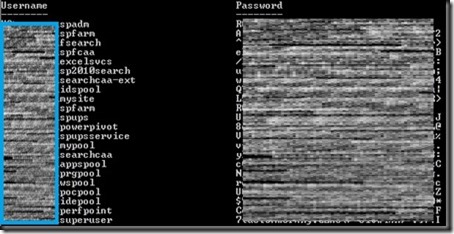
    The output will look similar to:
    screenshot1
    Special Thanks:
    Huge thanks to Microsoft for unveiling this nugget to us during a recent call to SharePoint CritSit support. Derek Martin, of Slalom Consulting, and my jaws collectively hit the floor when they showed us this one and we knew we couldn’t keep it to ourselves.
    Update: Thanks to Todd Klindt for pointing out that the Live Writer Add-in that I have been using makes the code easily readable, but horrible to copy. Download the .ps1 file from here or the text file version from here rather than trying to copy from above and save yourself some time.
    powershell notepad
  • What are the PowerShell cmdlets that correspond to STSADM commands?

    Now that SharePoint 2010 is intertwined with PowerShell have you been looking for that cipher that tells you what PowerShell command you can run to do all of the STSADM commands that you know and love from SharePoint 2007 in SharePoint 2010?  I was too!  Here is the list that I have come up with (combined with our good friends at TechNet):

    PowerShell cmdlets STSADM Commands
    Enable-SPFeature Activatefeature
    Enable-SPInfoPathFormTemplate Activateformtemplate
    New-SPAlternateUrl Addalternatedomain
    Mount-SPContentDatabase Addcontentdb
     
    New-SPContentDatabase
    Install-SPDataConnectionFile Adddataconnectionfile
    New-SPExcelFileLocation Add-ecsfiletrustedlocation
    New-SPExcelDataProvider Add-ecssafedataprovider
    New-SPExcelDataConnectionLibrary Add-ecstrusteddataconnectionlibrary
    New-SPExcelUserDefinedFunction Add-ecsuserdefinedfunction
    Add-SPInfoPathUserAgent Addexemptuseragent
    New-SPManagedPath Addpath
    None Addpermissionpolicy
    Add-SPSolution Addsolution
    Install-SPWebTemplate Addtemplate
    New-SPUser Adduser
    Install-SPWebPartPack Addwppack
    New-SPAlternateUrl Addzoneurl
    Set-SPInfoPathWebServiceProxy Allowuserformwebserviceproxy
     
    Use the AllowForUserForms and Identity parameters.
    Set-SPInfoPathWebServiceProxy Allowwebserviceproxy
     
    Use the AllowWebServiceProxy and Identity parameters.
    Set-SPWebApplication Authentication
     
    Use the AuthenticationMethod or AuthenticationProvider parameters.
    Backup-SPConfigurationDatabase Backup
     
    Backup-SPFarm
     
    Backup-SPSite
    Get-SPBackupHistory Backuphistory
    New-SPCentralAdministration Createadminvs
    New-SPSite Createsite
    New-SPSite Use the ContentDatabase parameter. Createsiteinnewdb
     
    New-SPContentDatabase
    New-SPWeb Createweb
    Disable-SPFeature Deactivatefeature
    Disable-SPInfoPathFormTemplate Deactivateformtemplate
    Remove-SPAlternateUrl Deletealternatedomain
    Remove-SPConfigurationDatabase Deleteconfigdb
    Dismount-SPContentDatabase Deletecontentdb
    Remove-SPManagedPath Deletepath
    Remove-SPSite Deletesite
    Remove-SPSolution Deletesolution
    Uninstall-SPWebTemplate Deletetemplate
    Remove-SPUser Deleteuser
    Remove-SPWeb Deleteweb
    Uninstall-SPWebPartPack Deletewppack
    Remove-SPAlternateUrl Deletezoneurl
    Install-SPSolution Deploysolution
    Install-SPWebPartPack Deploywppack
    Get-SPSolution Displaysolution
    Set-SPContentDeploymentPath Editcontentdeploymentpath
    Get-SPAlternateURL Enumalternatedomains
    Get-SPContentDatabase Enumcontentdbs
    Get-SPDataConnectionFileDependent Enumdataconnectionfiledependants
    Get-SPDataConnectionFile Enumdataconnectionfiles
    Get-SPInfoPathUserAgent Enumexemptuseragents
    Get-SPInfoPathFormTemplate Enumformtemplates
    Get-SPServiceInstance Enumservices
    Get-SPSiteAdministration (To run this cmdlet, you must be a member of the Farm Administrators group.) Enumsites
     
    Get-SPSite (To run this cmdlet, you must be a local administrator on the computer where SharePoint 2010 Products is installed.)
    Get-SPSolution Enumsolutions
    Get-SPWeb Enumsubwebs
    Get-SPWebTemplate Enumtemplates
    Get-SPUser Enumusers
    Get-SPWebPartPack Enumwppacks
    Get-SPAlternateURL Enumzoneurls
    Start-SPAdminJob Execadmsvcjobs
    Export-SPWeb Export
    New-SPWebApplication Extendvs
    New-SPWebApplicationExtension Extendvsinwebfarm
    Get-SPWebApplication Getadminport
     
    Use the following syntax:
     
    Get-SPWebApplication -IncludeCentralAdministration | ? {$_.IsAdministrationWebApplication -eq $true}
     
    Get-SPDataConnectionFile Getdataconnectionfileproperty property
     
    Use the following syntax:
     
    Get-SPDataConnectionFile | where {$_.Name -eq “dataConFileName”} | format-list
     
    Get-SPInfoPathFormTemplate Getformtemplateproperty property
     
    Use the following syntax:
     
    Get-SPInfoPathFormTemplate | where {$_.DisplayName -eq “formTemplateName”} | format-list
     
    Get-SPFarmConfig Getproperty
     
    Get-SPTimerJob
     
    Disable-SPTimerJob
     
    Enable-SPTimerJob
     
    Set-SPTimerJob
     
    Start-SPTimerJob
    Get-SPSiteAdministration Getsitelock
    Get-SPAlternateURL Geturlzone
    Import-SPWeb Import
    Install-SPFeature Installfeature
    Get-SPLogLevel Listlogginglevels
    Get-SPEnterpriseSearchSecurityTrimmer Listregisteredsecuritytrimmers
    Move-SPSite Mergecontentdbs
    Move-SPUser Migrateuser
    For the Osearch parameters farmcontactemail, farmperformancelevel, farmserviceaccount, and farmservicepassword, use the Get-SPEnterpriseSearchService and Set-SPEnterpriseSearchService cmdlets. Osearch
     
    For the Osearch parameters start and stop, use the Start-SPEnterpriseSearchServiceInstance and Stop-SPEnterpriseSearchServiceInstance cmdlets, respectively.
     
    For the Osearch parameter defaultindexlocation, use the Get-SPEnterpriseSearchServiceInstance and Set-SPEnterpriseSearchServiceInstance cmdlets.
    Use the Get-SPEnterpriseSearchServiceApplication cmdlet to retrieve the specific Search service application, and then use DiacriticSensitive parameter from the Set-SPEnterpriseSearchServiceApplication cmdlet. Osearchdiacriticsensitive
    Start-SPServiceInstance Provisionservice
    Stop-SPInfoPathFormTemplate Quiesceformtemplate
    Update-SPInfoPathFormTemplate Reconvertallformtemplates
    New-SPEnterpriseSearchSecurityTrimmer Registersecuritytrimmer
    Uninstall-SPDataConnectionFile Removedataconnectionfile
    Remove-SPExcelFileLocation Remove-ecsfiletrustedlocation
    Remove-SPExcelDataProvider Remove-ecssafedataprovider
    Remove-SPExcelDataConnectionLibrary Remove-ecstrusteddataconnectionlibrary
    Remove-SPExcelFileLocation Remove-ecsuserdefinedfunction
    Remove-SPInfoPathUserAgent Removeexemptuseragent
    Uninstall-SPInfoPathFormTemplate Removeformtemplate
    Rename-SPServer Renameserver
    Set-SPSite Renamesite
     
    Use the Url parameter.
    Set-SPWeb Renameweb
     
    Use the RelativeUrl parameter.
    Restore-SPFarm Restore
     
    Restore-SPSite
    Uninstall-SPSolution Retractsolution
    Start-SPContentDeploymentJob Runcontentdeploymentjob
    Install-SPFeature Scanforfeatures
     
    Use the Scanforfeatures parameter.
    Set-SPCentralAdministration Setadminport
    Connect-SPConfigurationDatabase Setconfigdb
    Set-SPContentDeploymentJob Setcontentdeploymentjobschedule
    Set-SPDataConnectionFile Setdataconnectionfileproperty
    Set-SPExcelFileLocation Set-ecsexternaldata
    Set-SPExcelServiceApplication Set-ecsloadbalancing
     
    Use the LoadBalancingScheme parameter.
    Set-SPExcelServiceApplication Set-ecsmemoryutilization
     
    Use the MemoryCacheThreshold and PrivateBytesMax parameters.
    Set-SPExcelServiceApplication Set-ecssecurity
     
    Use the CrossDomainAccessAllowed, EncryptedUserConnectionRequired, and FileAccessMethod parameters.
    Set-SPExcelServiceApplication Set-ecssessionmanagement
     
    Use the SessionsPerUserMax and SiteCollectionAnonymousSessionsMax parameters.
    Set-SPExcelServiceApplication Set-ecsworkbookcache
     
    Use the Workbookcache and WorkbookCacheSizeMax parameters.
    Set-SPInfoPathFormTemplate Setformtemplateproperty
    Set-SPLogLevel Setlogginglevel
    Set-SPFarmConfig Setproperty
     
    Get-SPTimerJob
     
    Disable-SPTimerJob
     
    Enable-SPTimerJob
     
    Set-SPTimerJob
     
    Start-SPTimerJob
    Set-SPSiteAdministration Setsitelock
     
    Use the LockState parameter.
    Get-SPSiteSubscription Setsiteuseraccountdirectorypath
     
    New-SPSiteSubscription
     
    Remove-SPSiteSubscription
    Set-SPWorkflowConfig Setworkflowconfig
    Set-SPSiteAdministration Siteowner
    Install-SPSolution Syncsolution
     
    Use the Synchronize parameter.
    Remove-SPWebApplication Unextendvs
    Uninstall-SPFeature Uninstallfeature
    Start-SPInfoPathFormTemplate Unquiesceformtemplate
    Remove-SPEnterpriseSearchSecurityTrimmer Unregistersecuritytrimmer
    Set-SPManagedAccount Updateaccountpassword
    Install-SPInfoPathFormTemplate Upgradeformtemplate
    Update-SPSolution Upgradesolution
    Install-SPInfoPathFormTemplate Uploadformtemplate
    Get-SPUser Userrole
     
    Move-SPUser
     
    New-SPUser
     
    Remove-SPUser
     
    Set-SPUser
    Test-SPInfoPathFormTemplate Verifyformtemplate
       
    Not made into PowerShell cmdlets  
    Binddrservice  
    Blockedfilelist  
    Canceldeployment  
    Changepermissionpolicy  
    Copyappbincontent  
    Creategroup  
    Databaserepair  
    Deleteadminvs  
    Deletegroup  
    Deletepermissionpolicy  
    Disablessc  
    Email  
    Enablessc  
    Enumdeployments  
    Enumgroups  
    Enumroles  
    Forcedeletelist  
    Getosearchsetting  
    Getsiteuseraccountdirectorypath  
    Listqueryprocessoroptions  
    Localupgradestatus  
    Managepermissionpolicylevel  
    Quiescefarm  
    Quiescefarmstatus  
    Refreshdms  
    Refreshsitedms  
    Registerwsswriter  
    Removedrservice  
    Removesolutiondeploymentlock  
    Retractwppack  
    Setapppassword  
    Setosearchsetting  
    Setqueryprocessoroptions  
    Unquiescefarm  
    Unregisterwsswriter  
    Updatealerttemplates  
    Updatefarmcredentials  
    Upgrade  
    Upgradetargetwebapplication
     

    As I was more than halfway through putting my list together for this blog I ran across the TechNet article where I sourced the links and some of the content for this posting: http://technet.microsoft.com/en-us/library/ff621084.aspx

    Just 3 articles away I ran across the Stsadm to Windows PowerShell mapping (SharePoint Foundation 2010) article which calls out the subset of commands that are available in SharePoint Foundation.

  • SharePoint 2010 and the Site Directory

    My colleague and friend, Derek Martin of Slalom Consulting, just posted about a bug that we found with SharePoint 2010 and the Site Directory. 

    The short story is when you enable the Site Directory and you are using SharePoint 2010 in Claims mode for your web apps (including the site that houses the site directory) Central Administration is in Classic mode (the default and recommended way) and actions that call a web service from CA that touch back to the Site Directory will fail with errors that do not give you any real clues as to what is going on.

    The bug has been logged with Microsoft and we are awaiting the Product Team’s acceptance the they will fix this with a patch, service pack or QFE.  More when we hear it.

    For the full details please check out Derek’s blog.

  • SharePoint 2010 Farm Service Account passwords expired?!?!?!?

    Scenario:

    Managed service accounts passwords expired.  Access to part of Central Administration are no longer accessible.  Sites are starting to go down because app pool passwords are managed accounts and have expired.

    Soapbox moment:

    Firstly, there is NO real excuse for this in SharePoint 2010 because the ability to have this done automagically for you is BUILT-IN, so either your farm admin is so over taxed (usually the case) or incompetent (the two aren’t mutually exclusive). 
    I take the liberty to say all of this as someone who has had this happen to them, otherwise I wouldn’t be able to write about it, right?

    Resolution:

    To start, you aren’t going to be able to do anything with SharePoint until you can get the Timer Job Service running again because everything is driven by timer jobs. 
    Using a credential that has full admin rights to the box and is a Farm admin, change the account the Timer Job Service runs as and start the service.  This must be done on all servers in the farm. 
    Don’t fret, the next things you are going to do is fix this back to the way it should be but you can’t do the next steps without the timer job service running, so just play along.

    Go to http://www.yourserver.com/_admin/ManagedAccounts.aspx and edit your farm service account and tell it to change the password now.

    Go to http://www.yourserver.com/_admin/FarmCredentialManagement.aspx and select Farm Account.  You will see your registered service account (the one that you just changed the password for) and click ok.  This will go reset your Timer Job Service account to the registered account which now is active and working.
    Next, create a text file called on your server which will be a list, one account per line, of service accounts that you are going to have auto-updated.

    Then using the SharePoint 2010 Management Shell interface change the passwords and set to auto change run using this variable script:

    foreach ($account in Get-Content driveletter:filename.txt)
    {
    Set-SPManagedAccount -Identity $account -AutoGeneratePassword -PreExpireDays n#days -Schedule “monthly between n#dayofthemonthvalue hh:mm:ss and n#dayofthemonthvalue hh:mm:ss” -confirm:$false
    }

    The script that I actually used, without the variables looks like this:

    foreach ($account in Get-Content c:managedaccounts.txt)
    {
    Set-SPManagedAccount -Identity $account -AutoGeneratePassword -PreExpireDays 30 -Schedule “monthly between 7 02:00:00 and 7 03:00:00” -confirm:$false
    }

    Once this command has completed successfully you will see that your last password change just happened and that your next password change is scheduled.  Make sure that if your next scheduled password change isn’t in conflict with a password change minimum group policy that won’t allow passwords to be changed before a minimum number of days or you will end up with some errors in your ULS Logs and some misfired password change attempts.

    Lastly, go to http://www.yourserver.com/_admin/FarmCredentialManagement.aspx and walk through all of the farm credentials and let the accounts get synced up.  This should re-spin up the app pools and get your users back into the site, but if not, do an IISRESET and things should be back online.

    Shout outs

    Huge thanks to my partners in crime on this one, Derek Martin and Trent Foley of Slalom Consulting, for helping with the out of the gate perfect PowerShell scripts that are referenced above.

    While I was busy figuring out how to break back in to Central Admin, they figured out the proper script to reset the passwords and set the auto change programmatically.  This script can be used in advance of this type of shenaniganal activity to ensure that while you are building your farm you get this set right the first time and not have to do it manually (which is often the excuse when you are using 30+ managed accounts in a farm).